Loading
Get Form Repair And Maintenance Report
How it works
-

Open form follow the instructions
-

Easily sign the form with your finger
-

Send filled & signed form or save
How to fill out the Form Repair And Maintenance Report online
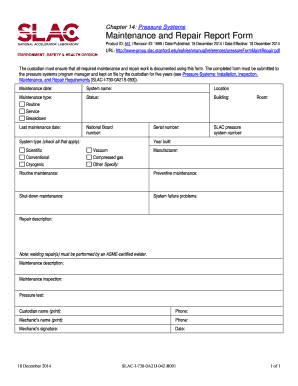
Completing the Form Repair And Maintenance Report online is essential for documenting maintenance and repair work. This guide provides detailed, step-by-step instructions to ensure that users can accurately complete the form and fulfill their responsibilities.
Follow the steps to effectively complete the form
- Press the 'Get Form' button to access the form and open it in the appropriate online editor.
- Fill in the maintenance date. This is the date when the maintenance work was performed and should be clearly stated.
- Provide the system name. This refers to the specific pressure system that the maintenance report is for, ensuring accurate identification.
- Specify the location of the system. Pinpointing the exact area will aid in tracking and administration.
- Select the type of maintenance performed by checking the relevant box: Routine, Service, or Breakdown. This helps categorize the nature of maintenance.
- Indicate the status of the system. This information supports understanding of the current condition of the system post-maintenance.
- Enter the building where the system is located to provide context for the maintenance activity.
- Document the last maintenance date for tracking purposes; this shows the frequency of maintenance for the system.
- Include the National Board number and serial number of the system — vital for regulatory and safety compliance.
- Check all applicable system types from the options provided: Scientific, Conventional, Cryogenic, or specify any other type.
- State the room number where the system is situated to further enhance identification.
- If applicable, record the SLAC pressure system number for proper documentation and traceability.
- Fill in the year built, which is important for understanding the system's age and related maintenance needs.
- Provide the manufacturer name to ensure proper references for parts and maintenance practices.
- Document the routine maintenance, preventive maintenance, and any shut-down maintenance that has taken place.
- Indicate any system failure problems that have been noticed to assist in long-term solutions.
- Detail the repair description, clearly explaining what repairs were done.
- Include maintenance descriptions, inspections performed, and any pressure tests conducted to support thorough record-keeping.
- Print the custodian's name, phone number, mechanic's name, and phone number to ensure accountability.
- Lastly, get the mechanic's signature and date the form to officially conclude the report. Ensure all fields are complete.
- After completing the form, save changes, and consider downloading, printing, or sharing it as required.
Complete your document online today to ensure proper maintenance reporting.
How do I write a monthly maintenance report? Identify the purpose and audience of the report. ... Gather data and information on maintenance activities that were performed during the month. ... Organize the information into an easy-to-read format. ... Include a summary of the key takeaways from the report.