Loading
Get Niagara University Transcripts
How it works
-

Open form follow the instructions
-

Easily sign the form with your finger
-

Send filled & signed form or save
How to fill out the Niagara University transcripts online
Filling out the Niagara University transcripts request form online can be a straightforward process with the right guidance. This document will walk you through every section of the form to ensure a smooth experience in obtaining your transcripts.
Follow the steps to complete your transcript request effectively.
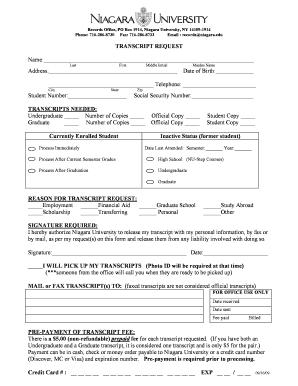
- Press the ‘Get Form’ button to access the transcript request form and open it for editing.
- Start by entering your full name in the designated fields: Last Name, First Name, and Middle Initial.
- Provide your current address, ensuring to include city, state, and zip code. Also, if applicable, indicate your maiden name.
- Fill in your date of birth and telephone number in the respective fields for identification purposes.
- Include your student number and social security number as requested on the form to help process your request efficiently.
- Indicate the type of transcripts you need by checking the appropriate boxes for undergraduate or graduate transcripts, along with the number of copies required.
- If you are a currently enrolled student, select the option to process immediately or choose to wait for your current semester grades.
- In the section titled 'Reason for transcript request,' check all applicable reasons for your request, such as employment or graduate school.
- Sign and date the form in the section provided, authorizing Niagara University to release your transcript as specified in your request.
- Specify whether you will pick up your transcripts in person or if you would like them mailed or faxed to a specific address. Be aware that faxed transcripts are not considered official.
- Complete the payment section to cover the $5.00 non-refundable fee for each transcript requested. Provide payment details as instructed.
- After filling in all required fields, review your form for any errors before final submission. Save the changes and download a copy for your records.
Complete your transcript request online today to ensure timely processing of your academic records.
It has a total undergraduate enrollment of 2,785 (fall 2021), its setting is suburban, and the campus size is 182 acres. It utilizes a semester-based academic calendar. Niagara University's ranking in the 2022-2023 edition of Best Colleges is Regional Universities North, #33.