Loading
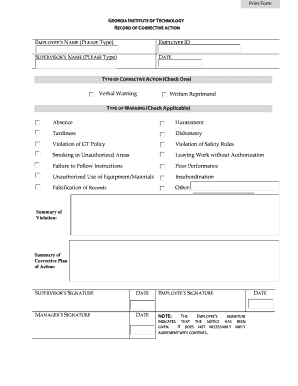
Get Corrective Action Form - Georgia Institute Of Technology - Policies Gatech
How it works
-

Open form follow the instructions
-

Easily sign the form with your finger
-

Send filled & signed form or save
How to fill out the Corrective Action Form - Georgia Institute Of Technology - Policies Gatech online
This guide provides clear instructions for users on completing the Corrective Action Form for the Georgia Institute of Technology. Whether you are a supervisor or an employee, understanding each component of the form is essential for effective communication and documentation.
Follow the steps to successfully complete the form.
- Click ‘Get Form’ button to access the Corrective Action Form and open it in your selected editor.
- Enter the employee's name in the designated field. Make sure to type the full name clearly, as it is important for identification purposes.
- Input the employee ID in the appropriate box. This helps to uniquely identify the employee within the institution.
- Type the supervisor's name in the specified section. This indicates who is responsible for the corrective action.
- Fill in the date on which the corrective action is being documented. This will help in record-keeping and tracking progress.
- Select the type of corrective action by checking either 'Verbal Warning' or 'Written Reprimand,' depending on the situation.
- Indicate the type of warning by checking all that apply from the provided options, such as absence, harassment, or tardiness.
- Provide a summary of the violation in the designated area. Be concise yet thorough in outlining the issues that led to the corrective action.
- Outline the summary of the corrective plan of action. This should detail the steps that will be taken to address the violation.
- Have the supervisor sign and date the form in the appropriate field to confirm the corrective action process.
- The employee should then sign and date the form, acknowledging that they have received the notice. Note that this does not necessarily imply agreement with the contents.
- Finally, ensure the manager signs and dates the form. This adds another layer of verification to the process.
- Review all entries for accuracy. Once confirmed, you can save changes, download, print, or share the completed form as necessary.
Complete your documentation online and ensure smooth communication regarding corrective actions.
Document Deadlines All application files will include: Common Application. Official transcript(s) with 9-12th courses and 9-11th grades. Students who are deferred or apply Regular Decision are required to submit an updated transcript with Fall term senior grades.
Industry-leading security and compliance
US Legal Forms protects your data by complying with industry-specific security standards.
-
In businnes since 199725+ years providing professional legal documents.
-
Accredited businessGuarantees that a business meets BBB accreditation standards in the US and Canada.
-
Secured by BraintreeValidated Level 1 PCI DSS compliant payment gateway that accepts most major credit and debit card brands from across the globe.