Loading
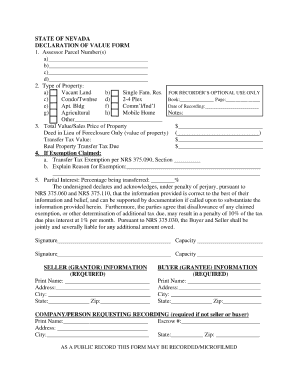
Get State Of Nevada Declaration Of Value Form - H T T P : / / T A X . S T A T E ... - Tax State Nv
How it works
-

Open form follow the instructions
-

Easily sign the form with your finger
-

Send filled & signed form or save
How to fill out the State Of Nevada Declaration Of Value Form online
Filling out the State Of Nevada Declaration Of Value Form is an important step in ensuring compliance with the state's property transaction requirements. This guide will provide you with clear, step-by-step instructions to help you navigate the process with ease.
Follow the steps to complete your declaration form efficiently.
- Press the ‘Get Form’ button to acquire the form and open it in your preferred document editor.
- Begin by entering the property owner's name and contact information in the designated fields. Ensure that the details match official records to avoid discrepancies.
- Next, provide the property's physical address, including street number, street name, city, and zip code. Accuracy is crucial as this information is used for property identification.
- Identify the type of property being declared, selecting from options such as residential, commercial, or vacant land. Each category may have different tax implications.
- In the section regarding sale price or value, input the amount agreed upon for the transaction. Make sure this reflects the actual terms of the sale.
- Complete any additional required fields, such as seller and buyer information, and any necessary disclosures as mandated by Nevada law.
- Once all sections are completed, review the form carefully for any errors or omissions. It's important to verify all information to prevent processing delays.
- Finally, save your changes, and then choose from available options to download, print, or share the completed form as needed.
Start filling out your documents online today for a smoother experience.
It is preferred that both parties complete and sign the form as both the Seller/Grantor and Buyer/Grantee (Capacity) are jointly and severally responsible for payment of the transfer tax. If Seller/Grantor or Buyer/Grantee do not sign, the person who signs is required to identify themselves (Capacity).
Industry-leading security and compliance
US Legal Forms protects your data by complying with industry-specific security standards.
-
In businnes since 199725+ years providing professional legal documents.
-
Accredited businessGuarantees that a business meets BBB accreditation standards in the US and Canada.
-
Secured by BraintreeValidated Level 1 PCI DSS compliant payment gateway that accepts most major credit and debit card brands from across the globe.