Loading
Get Electronic Funds Transfer (eft) Authorization - Public Employees ... - Nvpers
How it works
-

Open form follow the instructions
-

Easily sign the form with your finger
-

Send filled & signed form or save
How to fill out the Electronic Funds Transfer (EFT) Authorization - Public Employees ... - Nvpers online
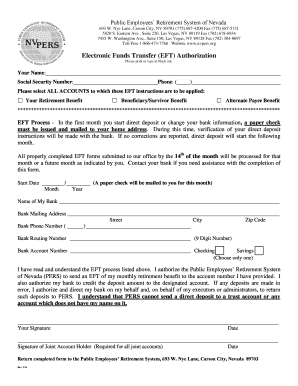
Filling out the Electronic Funds Transfer (EFT) Authorization form is a crucial step for public employees looking to receive their retirement benefits electronically. This guide provides clear, step-by-step instructions to assist users in completing the form accurately and efficiently.
Follow the steps to successfully complete the form.
- Click ‘Get Form’ button to obtain the form and open it in the editor.
- Enter your full name in the designated field labeled 'Your Name'.
- Fill in your Social Security number accurately to ensure proper identification.
- Provide your phone number in the specified area, ensuring that it is formatted correctly.
- Select all accounts to which these EFT instructions apply by marking the checkboxes for your Retirement Benefit, Beneficiary/Survivor Benefit, or Alternate Payee Benefit.
- Indicate the start date for your EFT by providing the month and year. Remember that a paper check will be issued for the first month.
- Fill out your bank's name and mailing address, ensuring accuracy in the street address, city, and zip code.
- Include your bank's phone number in the specified field.
- Enter the bank routing number, which is a 9-digit number typically found on the bottom of your checks.
- Input your bank account number in the appropriate field.
- Choose the type of account by indicating whether it is a checking or savings account.
- Read the provided EFT process information to ensure understanding and compliance.
- Sign and date the form in the designated signature fields.
- If applicable, include the signature of a joint account holder and the date.
- Return the completed form to the Public Employees’ Retirement System at the specified address.
Complete your EFT Authorization form online today to streamline your retirement benefit payments.
Registered organizations have the ability to pay for queries via Electronic Funds Transfer (EFT). Organizations choosing to pay by EFT must submit an Electronic Funds Transfer Authorization form before EFT payments can be processed.