Loading
Get Npersnegov
How it works
-

Open form follow the instructions
-

Easily sign the form with your finger
-

Send filled & signed form or save
How to fill out the Npersnegov online
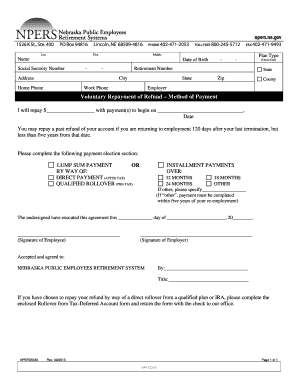
The Npersnegov form is essential for managing your retirement account specifically for those considering a voluntary repayment of a refund. This guide will walk you through the process of filling out the form online, ensuring that you provide all necessary information accurately.
Follow the steps to complete the Npersnegov form successfully.
- Click ‘Get Form’ button to obtain the form and open it in your preferred digital editor.
- Enter your last name, first name, and middle name in the designated fields. Ensure that the names are spelled correctly to match your identity documents.
- Provide your date of birth in the specified format, ensuring accuracy as this information is crucial for identification purposes.
- Fill in your Social Security number carefully, entering it without additional symbols or spaces to avoid any processing delays.
- Input your current address, including street address, city, state, county, and zip code. This information is essential for official correspondence.
- Add your home phone and work phone numbers in the appropriate fields to facilitate communication if needed.
- Select the plan type by checking the appropriate option. Make sure to read the descriptions provided to choose the plan that best fits your situation.
- In the voluntary repayment section, indicate the amount you intend to repay and the start date for these payments.
- Choose your method of repayment. Select one of the provided options: lump sum payment or installment payments. If you choose installment payments, specify the duration in months.
- If you select 'other' for the installment payments, clearly specify the payment terms, ensuring it meets the requirement of being completed within five years.
- Complete the agreement by signing your name and including the date. The employer also needs to provide their signature and title.
- Ensure all sections are complete and accurate before saving your changes. You can then download, print, or share the completed form as needed.
Complete the Npersnegov form online now to streamline your retirement repayment process.
Tax Transcripts typically reflect updates and changes each week on Tuesdays and Fridays. If your tax account follows a daily processing cycle, you can expect to see tax transcript updates each week on Tuesdays anytime between 12:01 a.m. – 11:59 p.m. Eastern Standard Time.