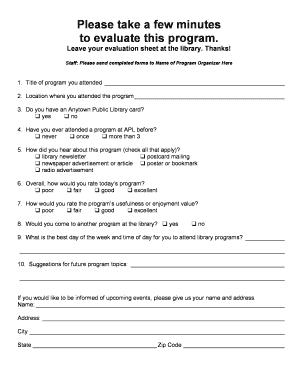
Please take a few minutes to evaluate this program. Leave your evaluation sheet at the library. Thanks! Staff: Please send completed forms to Name of Program Organizer Here 1. Title of program you.
Open form follow the instructions
Easily sign the form with your finger
Send filled & signed form or save
How to fill out the Sample Program Evaluation Form 2 - Montana State Library - Msl Mt online
The Sample Program Evaluation Form 2 allows users to provide valuable feedback regarding library programs. Completing this form online is straightforward and helps improve future offerings based on participant insights.
Follow the steps to complete the form efficiently.
- Press the ‘Get Form’ button to access the document and open it for editing.
- In the first section, enter the title of the program you attended in the designated field.
- Next, provide the location where the program took place in the following field.
- Indicate whether you possess an Anytown Public Library card by selecting ‘yes’ or ‘no’.
- For your experience, mark how many times you attended a program at APL before by choosing from the options: ‘never,’ ‘once,’ or ‘more than 3.’
- In the next section, select all sources from which you learned about this program.
- Rate the overall quality of today’s program by choosing one of the options ranging from ‘poor’ to ‘excellent.’
- Next, assess the program’s usefulness or enjoyment value using the same rating scale.
- Respond to whether you would attend another library program by selecting ‘yes’ or ‘no.’
- Share your preferred day of the week and time for attending library programs in the provided space.
- Provide suggestions for future program topics in the designated section.
- If you wish to receive information on upcoming events, fill in your name and address details in the provided fields.
- Once all sections are completed, you can save the changes, download the document, or share it as needed.
Take a moment to complete the Sample Program Evaluation Form online to help enhance our future programs.
Experience a faster way to fill out and sign forms on the web. Access the most extensive library of templates available.
Related content
Search additional MSL resources: MSL Websites. GIS Data List. MT. ... II. Sample 2...
II. Development of the 2013–2017 Montana Historic Preservation Plan . ... revised plan...
to HP BASIC Program library for available programs in HP BASIC). 100. DATA HANDLING...
Get answers to your most pressing questions about US Legal Forms API.
What are 3 examples of evaluation forms?
Evaluation Forms Examples Employee Evaluation Form. Customer Service Evaluation Form. Peer Evaluation Form. Performance Improvement Plan Form. Event Evaluation Form. Training Course Feedback Template.
How do you fill out an evaluation form?
When you fill the form: Be honest and critical. Analyze your failures and mention the reasons for it. ... Keep the words minimal. ... Identify weaknesses. ... Mention your achievements. ... Link achievements to the job description and the organization's goals. ... Set the goals for the next review period. ... Resolve conflicts and grievances.
What do you say in an evaluation form?
Effective Performance Appraisal Phrases 1) Always on time (or even early) for meetings and conferences. ... 21) Has a cheerful attitude that benefits her teammates. ... 41) Excellent at customer service. ... 61) One of our most dependable team members. ... 81) Accepts constructive criticism and works to improve.
What should I write in my evaluation?
How to Write a Self Evaluation For a Performance Review Goals (personal or assigned) Areas of accomplishment since last review. Insights on productivity. Areas of improvement since last review. Growth plan or professional development plan. Company values/personal values.
How do I fill out an evaluation form?
How to Fill Out an Employee Evaluation Form Step 1: Gather Employee Information. ... Step 2: Assess Employee Responsibilities and Performance. ... Step 3: Use Objective Language. ... Step 4: Use Action Verbs. ... Step 5: Compare Performance Ratings. ... Step 6: Ask Open-Ended Questions. ... Step 7: Use a Point System.
Use professional pre-built templates to fill in and sign documents online faster. Get access to thousands of forms.
If you believe that this page should be taken down, please follow our DMCA take down process here.