Loading
Get Mn Doli
How it works
-

Open form follow the instructions
-

Easily sign the form with your finger
-

Send filled & signed form or save
How to fill out the Mn Doli online
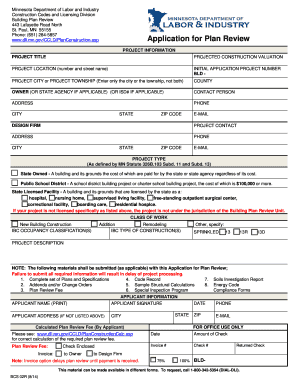
Filling out the Mn Doli form is essential for initiating your building plan review with the Minnesota Department of Labor and Industry. This guide provides clear, step-by-step instructions tailored to assist users of all experience levels in completing the form accurately and efficiently.
Follow the steps to successfully complete the Mn Doli form.
- Click the ‘Get Form’ button to access the Mn Doli form and open it in the online editor. Ensure you have a stable internet connection for a seamless experience.
- Begin by filling in the project information section. Input the project title and the projected construction valuation. Clearly specify the project location by providing the number and street name.
- Enter the initial application project number starting with 'BLD -'. Additionally, indicate either the project city or project township, but do not enter both. Then, select the county from the options provided.
- In the owner section, provide the name of the individual or state agency that owns the project. If applicable, include the ISD#.
- Fill out the contact person's details, including their address, phone number, city, state, ZIP code, and email address.
- Enter the information for the design firm and the project contact. Similar to the previous step, include all necessary address and contact information.
- Select the project type based on the definitions specified by the relevant Minnesota statute. Ensure the correct type is chosen to avoid future complications.
- Indicate the class of work by selecting from the options: new building construction, addition, remodeling, or other (specify).
- Provide a detailed description of the project in the project description field. This should summarize the scope and nature of the work involved.
- Review the required materials that must accompany your application. Ensure you have completed plans, specifications, any addenda, and calculated fees to avoid delays.
- Complete the applicant information section, including the applicant's name, signature, and address if not listed above, along with the calculated plan review fee.
- Finalize your submission by reviewing all entered information for accuracy. You will then have the option to save changes, download, print, or share the completed form.
Start filling out your Mn Doli form online today to ensure a smooth project review process!
Depositphotos Standard License This is a default license that allows you to use files for personal and commercial needs that fall within the terms of the license. In particular, you can use files for advertising, marketing, product packaging, newspapers and magazines, books, UI designs, and more.