Loading
Get Continuing Training - Compliance Form - Dps Mn
How it works
-

Open form follow the instructions
-

Easily sign the form with your finger
-

Send filled & signed form or save
How to fill out the Continuing Training - Compliance Form - Dps Mn online
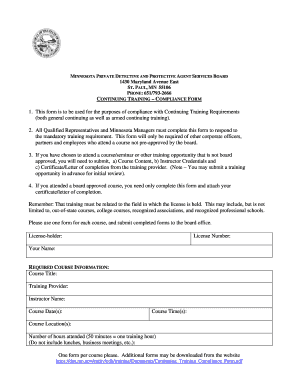
Completing the Continuing Training - Compliance Form is essential for meeting Minnesota's regulatory training requirements. This guide will assist you in filling out the form accurately and efficiently.
Follow the steps to complete the form successfully.
- Press the ‘Get Form’ button to access the document and open it in your preferred editor.
- Enter your license-holder information in the designated fields. This will include your License Number and Your Name.
- Fill out the required course information. Start with Course Title, Training Provider, and Instructor Name.
- Input the Course Date(s) and Course Time(s). Ensure to provide exact dates and times of attendance.
- Specify the Course Location(s) where the training took place.
- Indicate the Number of hours attended. Remember, 50 minutes equates to one training hour. Exclude breaks or business meetings.
- Review your completed form carefully to ensure all information is accurate before submission.
- Submit completed forms to the board office as instructed. You may save changes, download, print, or share the form for your records.
Complete your Continuing Training - Compliance Form online today to meet your training requirements.
Industry-leading security and compliance
US Legal Forms protects your data by complying with industry-specific security standards.
-
In businnes since 199725+ years providing professional legal documents.
-
Accredited businessGuarantees that a business meets BBB accreditation standards in the US and Canada.
-
Secured by BraintreeValidated Level 1 PCI DSS compliant payment gateway that accepts most major credit and debit card brands from across the globe.