Loading
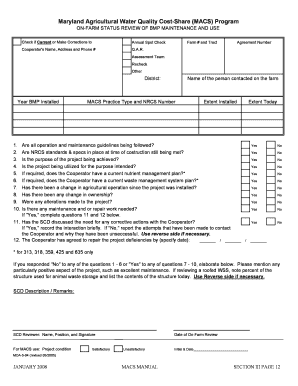
Get 4 - On-farm Status Review Form.xls - Maryland Department Of ... - Mda Maryland
How it works
-

Open form follow the instructions
-

Easily sign the form with your finger
-

Send filled & signed form or save
How to fill out the 4 - On-Farm Status Review Form.XLS - Maryland Department Of ... - Mda Maryland online
Filling out the 4 - On-Farm Status Review Form is an essential task for those participating in the Maryland Agricultural Water Quality Cost-Share Program. This guide aims to provide clear, step-by-step instructions for completing the form online, ensuring that all users can efficiently navigate the process.
Follow the steps to successfully complete the form.
- Click the ‘Get Form’ button to access the form and open it in your preferred editing tool.
- Begin with the section labeled 'Check if Current or Make Corrections to Annual Spot Check.' Fill in the cooperator's name, address, and phone number in the provided fields.
- Next, input the agreement number, farm number, and tract details under the respective fields.
- Indicate the assessment team responsible for the review and select the year when the best management practices (BMP) were installed.
- In the section for the person contacted on the farm, provide the name of the designated individual and list the MACS practice type along with the NRCS number.
- For the extent installed, enumerate the BMPs installed (1 through 10) in the corresponding spaces.
- Answer the questions related to the operation and maintenance guidelines as well as compliance with NRCS standards. Indicate 'Yes' or 'No' for each question.
- If any changes have occurred regarding the agricultural operation or ownership since the project installation, document those details in the designated areas.
- If maintenance or repair work is required, be sure to indicate this and briefly note your interaction with the cooperator regarding corrective actions.
- Conclude by specifying the date by which any identified deficiencies will be addressed by the cooperator in the provided space.
- Finally, ensure that the reviewer signs off on the form by filling in their name, position, and date of the on-farm review at the end of the document.
- Once finished, save your changes to the form. You can then download, print, or share the completed form as needed.
Take action now and complete the required documents online to ensure compliance and proper management of your agricultural practices.
Related links form
The Minnesota Department of Agriculture (MDA) has served our state for more than 125 years. The work we do touches every Minnesota citizen every day.
Industry-leading security and compliance
US Legal Forms protects your data by complying with industry-specific security standards.
-
In businnes since 199725+ years providing professional legal documents.
-
Accredited businessGuarantees that a business meets BBB accreditation standards in the US and Canada.
-
Secured by BraintreeValidated Level 1 PCI DSS compliant payment gateway that accepts most major credit and debit card brands from across the globe.