Loading
Get Mva Glen Burnie
How it works
-

Open form follow the instructions
-

Easily sign the form with your finger
-

Send filled & signed form or save
How to fill out the MVA Glen Burnie online
Completing the MVA Glen Burnie form online can streamline the process of certifying ownership of your vehicle. This guide will provide you with essential steps to ensure you fill out the form accurately and effectively.
Follow the steps to complete the MVA Glen Burnie form with ease.
- Press the ‘Get Form’ button to access the MVA Glen Burnie form and open it in your preferred document editor.
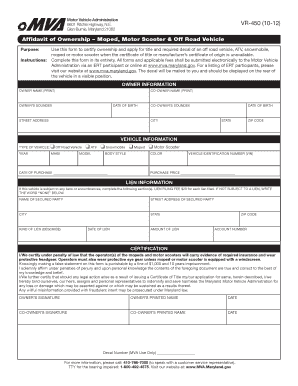
- Begin by filling out the owner information. Include the owner name, co-owner name, their Soundex codes, and dates of birth. Make sure to provide a complete street address along with the city, state, and zip code.
- In the vehicle information section, specify the type of vehicle you are registering, including options such as off road vehicle, ATV, snowmobile, moped, or motor scooter. Then, fill in the year, make, model, body style, color, and the vehicle identification number (VIN). Enter the date of purchase and the purchase price.
- If there are any liens associated with the vehicle, complete the lien information section. List the name and address of the secured party, the kind of lien, the date of the lien, the amount of the lien, and the account number. If there are no liens, simply write 'none.'
- In the certification section, read the statements carefully and ensure that you acknowledge the requirements for insurance and protective gear for operators of mopeds and motor scooters. Verify that you understand the implications of providing false information.
- Finally, sign and print your name along with the co-owner’s signature and printed name, adding the current date beside each signature.
- Once you have filled out the form, review all information for accuracy. Save any changes you made, and prepare to submit the form electronically along with any applicable fees.
Complete your document online today and ensure a smooth application process!
APPOINTMENTS REQUIRED – You Name the Time and Place, We'll Take Care of the Rest. Not sure if your transaction can be completed at home? Visit our Online Services tab below to see what services are available right now!