Get Kdor Liquorreport Audit
How it works
-

Open form follow the instructions
-

Easily sign the form with your finger
-

Send filled & signed form or save
How to fill out the Kdor Liquorreport Audit online
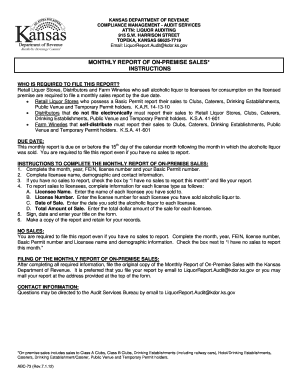
The Kdor Liquorreport Audit is an essential document for retail liquor stores, distributors, and farm wineries to report their monthly on-premise sales. This guide provides step-by-step instructions to help users navigate the process of completing this form online.
Follow the steps to successfully complete and submit your audit report.
- Press the ‘Get Form’ button to access the Kdor Liquorreport Audit and open it in your preferred editor.
- Fill in the month, year, Federal Employer Identification Number (FEIN), license number, and Basic Permit number. This information is crucial for identifying your report.
- Complete the licensee name, demographic details, and contact information to provide a clear identification of your business.
- If you have no sales to report, select the checkbox indicating ‘I have no sales to report this month’ and proceed to submit your report.
- If you reported sales to licensees, provide the necessary details for each transaction: including the licensee's name, license number, sale date, and the total sale amount.
- Affix your signature, include the date of submission, and write your title to authenticate the report.
- Retain a copy of the report for your records. This is important for future reference and compliance.
- After confirming all fields are accurately filled, submit the original copy of the Monthly Report of On-Premise Sales to the Kansas Department of Revenue. Email submission to LiquorReport.Audit@kdor.ks.gov is preferable. Alternatively, you may mail it to the address listed at the top of the form.
Complete your Kdor Liquorreport Audit online today to ensure compliance with state regulations.
To effectively score an audit for alcohol, you should first gather all relevant data regarding your liquor sales and inventory. Utilize the Kdor Liquorreport Audit to analyze your records, ensuring all transactions are accurately reported. This tool helps identify discrepancies and provides insights into compliance with local regulations. By following these steps, you can streamline your audit process and maintain a clear financial overview.