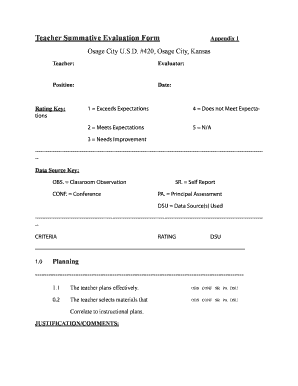
Get Teacher Summative Evaluation Form - Ksde
How it works
-

Open form follow the instructions
-

Easily sign the form with your finger
-

Send filled & signed form or save
How to fill out the Teacher Summative Evaluation Form - Ksde online
Filling out the Teacher Summative Evaluation Form is an important step in the evaluation process for educators. This guide will provide you with comprehensive, step-by-step instructions to help you accurately complete the form online.
Follow the steps to successfully complete the Teacher Summative Evaluation Form.
- To begin, press the ‘Get Form’ button to access the Teacher Summative Evaluation Form. This will open the document in your editing interface.
- Fill in the basic information at the top of the form, including the teacher's name, evaluator's name, their respective positions, and the date of evaluation. Ensure that all details are accurate and up to date.
- Review the rating key provided on the form. This key will guide you in rating the various criteria based on the defined scale: 1 for exceeds expectations, 2 for meets expectations, 3 for needs improvement, 4 for does not meet expectations, and 5 for not applicable.
- Proceed to evaluate each criterion listed in the form. For each aspect, such as planning effectiveness and the selection of materials, assess the teacher’s performance by selecting the appropriate rating according to the observations and data sources indicated.
- For every criterion you evaluate, provide justification or comments in the designated section. This is an opportunity to elaborate on your ratings, citing specific examples or evidence to support your assessments.
- Continue this process for all the evaluation criteria outlined in the form, ensuring that each aspect is addressed thoroughly and with appropriate documentation.
- Once you have completed the form, review all entries for accuracy and completeness. Make any necessary adjustments or corrections.
- Finally, you can choose to save the changes you made, download the form for your records, print it, or share it as needed.
Get started on completing the Teacher Summative Evaluation Form online today.
To create a teacher evaluation report, begin by gathering relevant data about the teacher's performance, including student outcomes and feedback from peers. Organize this information using the Teacher Summative Evaluation Form - Ksde, which provides a clear structure for presentation. Finally, analyze the results, highlighting strengths and areas for development, to produce a comprehensive report that serves as a valuable tool for professional growth.
Industry-leading security and compliance
-
In businnes since 199725+ years providing professional legal documents.
-
Accredited businessGuarantees that a business meets BBB accreditation standards in the US and Canada.
-
Secured by BraintreeValidated Level 1 PCI DSS compliant payment gateway that accepts most major credit and debit card brands from across the globe.