Loading
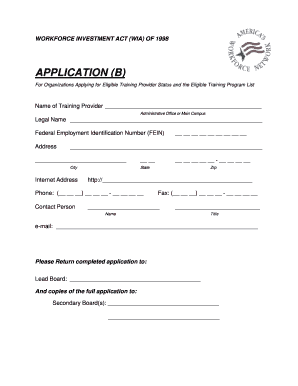
Get Application (b) - Connecticut Department Of Labor - Ctdol State Ct
How it works
-

Open form follow the instructions
-

Easily sign the form with your finger
-

Send filled & signed form or save
How to fill out the APPLICATION (B) - Connecticut Department Of Labor - Ctdol State Ct online
Completing the APPLICATION (B) for the Connecticut Department Of Labor is an essential step for organizations seeking eligible training provider status. This guide provides a clear and supportive walkthrough for filling out the application online, ensuring users can effectively navigate each section of the form.
Follow the steps to successfully complete the application online.
- Press the ‘Get Form’ button to access the APPLICATION (B) and open it in your chosen digital editor.
- Begin by entering the name of your training provider and the address of your administrative office or main campus in the designated fields.
- Fill in the legal name of the organization and the Federal Employment Identification Number (FEIN) to authenticate your application.
- Provide contact information, including the main phone number, fax number, and email address of the contact person for the organization.
- Complete the financial statement request section by including the required financial documents, such as an income statement and balance sheet prepared by a licensed certified public accountant.
- List the organization’s officers in the specified section and ensure all signatures are included by an authorized representative.
- Provide training site director information and qualifications for each training location, ensuring to detail educational background and relevant experience.
- Complete the sections for instructor information and qualifications, attaching resumes as needed.
- Fill out the training site information, including various approvals needed such as fire marshal and zoning officer approvals, as well as details on insurance coverage.
- Provide comprehensive program information for each training program offered, including admission requirements, accreditation status, and any associated fees.
- Attach all required documentation, including student record forms and the organization's complaint inquiry policy.
- Final checks should include reviewing all entries for accuracy, saving changes, and once completed, submitting the form either online or by printing for mailing.
Complete your APPLICATION (B) online today to ensure your organization is eligible for training provider status.
Each unemployment claim is effective for 52 weeks. When you are at the end of your benefit year, you will be notified to re-submit your claim using the blue button. Once your claim is processed, you may file your weekly certification.
Industry-leading security and compliance
US Legal Forms protects your data by complying with industry-specific security standards.
-
In businnes since 199725+ years providing professional legal documents.
-
Accredited businessGuarantees that a business meets BBB accreditation standards in the US and Canada.
-
Secured by BraintreeValidated Level 1 PCI DSS compliant payment gateway that accepts most major credit and debit card brands from across the globe.