Loading
Get Pueblo Community College Transcripts
How it works
-

Open form follow the instructions
-

Easily sign the form with your finger
-

Send filled & signed form or save
How to fill out the Pueblo Community College Transcripts online
This guide provides a comprehensive overview of how to complete the Pueblo Community College Transcripts form online. With step-by-step instructions, users will gain a clear understanding of how to successfully fill out this important document.
Follow the steps to complete your transcript request efficiently.
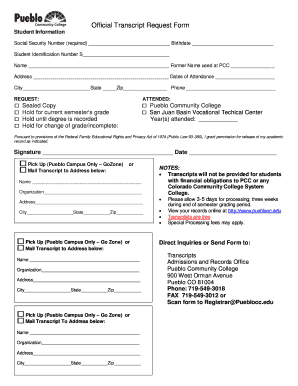
- Press the ‘Get Form’ button to access the official transcript request form and open it for completion.
- Input your Social Security Number in the required field. Following this, enter your birthdate to verify your identity.
- Provide your Student Identification Number to ensure accurate identification within the system.
- Fill in your full name as it appears in your records. If applicable, include any former name you used at Pueblo Community College.
- Enter your current address, city, state, and zip code to confirm your location. This is necessary for mailing purposes if you choose to send your transcript to a different address.
- Provide your phone number for any necessary communication regarding your transcript request.
- Select your request type. Indicate if you would like a sealed copy, to hold for the current semester’s grade, until a degree is recorded, or for a change of grade/incomplete.
- Specify the years you attended Pueblo Community College in the field provided.
- Grant permission for the release of your academic record by signing and dating the form.
- Choose how to receive your transcript—either by picking it up at the Pueblo campus or by mailing it to a specified address. Include the name, organization (if applicable), and mailing address details.
- Review your completed form for accuracy, then save your changes. You can choose to download, print, or share the form as needed.
Complete your transcript request online today for efficient processing.
To obtain transcripts from CSU Pueblo, visit the CSU Pueblo website and navigate to the transcript request section. Fill out the required form with your personal and academic details. Once you submit the form, the processing team will handle your request. This procedure for CSU Pueblo transcripts is designed to be efficient and user-friendly.