Loading
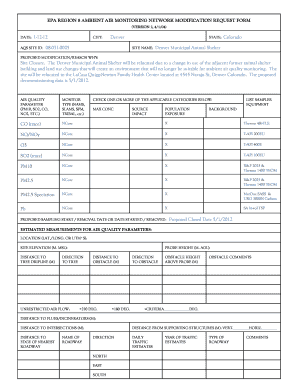
Get Region 8 Ambient Air Monitoring Network Modification Request Form (version 2, 4/1/04) - Apcd State
How it works
-

Open form follow the instructions
-

Easily sign the form with your finger
-

Send filled & signed form or save
How to use or fill out the REGION 8 AMBIENT AIR MONITORING NETWORK MODIFICATION REQUEST FORM (VERSION 2, 4/1/04) - Apcd State online
Filling out the REGION 8 ambient air monitoring network modification request form is essential for ensuring accurate air quality assessments. This guide provides a clear, step-by-step approach to assist users in completing the form effectively, ensuring compliance with regulatory requirements.
Follow the steps to successfully complete the form online.
- Press the ‘Get Form’ button to obtain the document and open it for editing.
- Begin by entering the date of filling out the form in the designated field.
- Input the AQS site ID in the corresponding box; this is a unique identifier for the monitoring site.
- Fill out the city field with the name of the city where the monitoring occurs, which in this case is Denver.
- Enter the state where the site is located; this should be Colorado.
- Specify the site name. In this example, you will enter 'Denver Municipal Animal Shelter'.
- Provide a concise explanation for the proposed modification or reason for the request. Clearly indicate the site closure details and the new location.
- In the air quality parameter section, check one or more applicable categories based on the type of pollutants monitored.
- Indicate the type of monitor used by selecting the appropriate option (NAMS, SLAMS, etc.) for each parameter.
- Complete the section for proposed sampling start or removal dates. Ensure to mention the exact dates relevant to the modification.
- For equipment details, list all relevant sampler equipment used at the monitoring site.
- Fill in the estimated measurements for air quality parameters, including location coordinates and site elevation.
- Provide necessary distances to significant landmarks like tree drip line, obstacles, and sources of pollution.
- Complete certification by entering your printed name and signing the form to verify the information provided.
- Once you have finished filling out the form, save the changes, download a copy, print it for records, or share it as needed.
Complete your forms online today to ensure timely processing and compliance.
Last Update: August 9th, 2021. A fax can cancel if you act quickly. There is no way to cancel a fax after it sends. If you successfully stop the fax, the other fax machine will mark the transmission as “not complete.” The receiving fax machine will print and data that transmits.
Industry-leading security and compliance
US Legal Forms protects your data by complying with industry-specific security standards.
-
In businnes since 199725+ years providing professional legal documents.
-
Accredited businessGuarantees that a business meets BBB accreditation standards in the US and Canada.
-
Secured by BraintreeValidated Level 1 PCI DSS compliant payment gateway that accepts most major credit and debit card brands from across the globe.