Get Boe 278 Occ
How it works
-

Open form follow the instructions
-

Easily sign the form with your finger
-

Send filled & signed form or save
How to fill out the Boe 278 Occ online
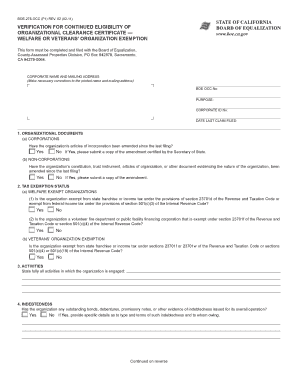
The Boe 278 Occ form is a vital document used for verifying continued eligibility for organizational clearance certificates specifically for welfare and veterans' organizations. This guide provides user-friendly instructions to fill out the form accurately and efficiently online.
Follow the steps to complete the Boe 278 Occ form online with ease.
- Click the 'Get Form' button to access the Boe 278 Occ form and open it in your online editor.
- Begin by reviewing the pre-printed corporate name and mailing address to ensure accuracy. Make any necessary corrections.
- Provide the BOE OCC number and corporate ID number, including the date when the last claim was filed.
- In the 'Organizational Documents' section, specify whether the organization's articles of incorporation have been amended since the last filing. If 'Yes,' submit a certified copy of the amendment.
- In the 'Tax Exemption Status' section, indicate if your organization is exempt from state franchise or income tax as applicable. Provide required details based on your organization's exemption.
- For the 'Activities' section, clearly describe all activities that the organization has been engaged in since the last submission.
- Address the 'Indebtedness' section by stating if the organization has any outstanding debts. If 'Yes,' provide information on the types of obligations and terms.
- In the 'Salaries' section, indicate if any individual's compensation exceeds the specified limits, and provide details for the top positions affected.
- Attach required financial statements, including the operating statement and balance sheet for the preceding year.
- If applicable, complete the 'Limited Liability Company' section with details of members and any recent amendments to the operating agreement.
- For the certification, ensure that the form is signed by an authorized representative and include their contact information.
- Review the completed form and attached documents for accuracy, then save your changes, and download, print, or share the form as needed.
Start filling out your Boe 278 Occ form online today to ensure your organization's continued eligibility.
Claiming yourself as an exemption depends on your specific financial situation and eligibility. If you have qualifying circumstances, such as being a senior or a veteran, you may benefit from claiming an exemption. It's advisable to consult with a tax professional or use platforms like uslegalforms to ensure you make informed decisions regarding your taxes. Taking this step can help you maximize your tax savings.