Loading
Get Legend Cl 777
How it works
-

Open form follow the instructions
-

Easily sign the form with your finger
-

Send filled & signed form or save
How to fill out the Legend Cl 777 online
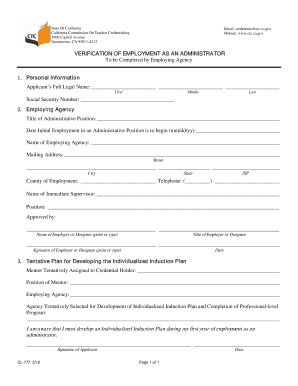
Filling out the Legend Cl 777 form online is an important step for individuals seeking verification of their employment as an administrator. This guide provides clear and supportive instructions to help users complete the form accurately.
Follow the steps to fill out the Legend Cl 777 form online.
- Press the ‘Get Form’ button to access the Legend Cl 777 form and open it for editing.
- In the Personal Information section, enter the applicant's full legal name in the designated fields: first name, middle name, and last name.
- Provide the Social Security number in the specified field.
- In the Employing Agency section, write the title of the administrative position.
- Enter the date the initial employment in an administrative position is set to begin in the mm/dd/yy format.
- Fill in the name of the employing agency in the appropriate field.
- Complete the mailing address section, including street address, city, state, and ZIP code.
- Indicate the county of employment and provide a telephone number.
- Enter the name of the immediate supervisor and their position.
- The employer or designee must print or type their name and title, followed by their signature and the date.
- In the tentative plan for developing the individualized induction plan section, list the mentor tentatively assigned to the credential holder and their position.
- Specify the employing agency and agency selected for the development of the individualized induction plan.
- The applicant must sign and date the form to acknowledge their awareness of developing the individualized induction plan during their first year of employment as an administrator.
- Once all fields are completed, users can save changes, download, print, or share the form as needed.
Complete your documents online for a smoother submission process.