Loading
Get Corporation - Document Filing Request Form - California Secretary ... - Sos Ca
How it works
-

Open form follow the instructions
-

Easily sign the form with your finger
-

Send filled & signed form or save
How to fill out the Corporation - Document Filing Request Form - California Secretary of State online
Filling out the Corporation - Document Filing Request Form is an essential step for businesses in California looking to file important documents. This guide will walk you through each section of the form, ensuring you understand how to complete it accurately and efficiently.
Follow the steps to complete your form effectively.
- Click 'Get Form' button to obtain the form and open it in the editor.
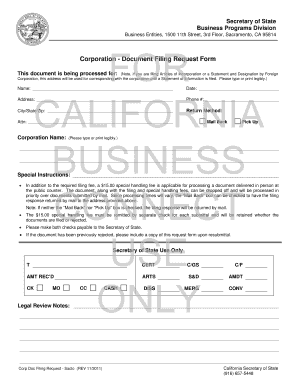
- In the first section, you will need to provide the entity name, date, address, phone number, city, state, and zip code. Make sure to type or print this information legibly.
- Indicate your preferred return method by selecting either 'Mail Back' or 'Pick Up'. If you choose 'Mail Back', ensure that the mailing address provided is accurate.
- Next, enter your corporation name clearly in the designated space. This is crucial for proper identification of your corporation.
- If you have any special instructions regarding this document, write them in the special instructions section provided.
- Be aware of any applicable fees, including a $15.00 special handling fee if you are delivering the document in person. Make sure to submit this fee with a separate check made out to the Secretary of State.
- Finally, check if you need to include any additional documents or copies, especially if this is a resubmission of a previously rejected document.
- Once you have completed the form, review all the information for accuracy. Save any changes and then proceed to download, print, or share the completed form as necessary.
Complete your Corporation - Document Filing Request Form online today to ensure your business stays compliant.
You can register a foreign (out-of-state) corporation in California by filing a Statement and Designation by Foreign Corporation (Form S&DC-S/N), along with a Certificate of Good Standing, to the Secretary of State's office. Through June 2023, there is no filing fee, so now is the time to register.