Loading
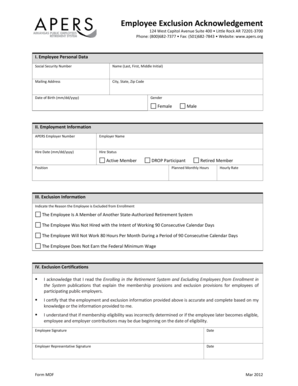
Get Employee Exclusion Acknowledgement - Arkansas Public ... - Apers
How it works
-

Open form follow the instructions
-

Easily sign the form with your finger
-

Send filled & signed form or save
How to fill out the Employee Exclusion Acknowledgement - Arkansas Public ... - Apers online
This guide provides a clear and structured approach to completing the Employee Exclusion Acknowledgement form for Arkansas Public Employees Retirement System (APERS) online. By following these steps, users can ensure that they fill out the form accurately and efficiently.
Follow the steps to complete the form effectively.
- Press the ‘Get Form’ button to obtain the form and open it in your preferred editing environment.
- In the Employee Personal Data section, provide your Social Security Number, Full Name (Last, First, Middle Initial), Mailing Address, City, State, Zip Code, Date of Birth (formatted as mm/dd/yyyy), and select your Gender from the options available.
- For Employment Information, fill in the APERS Employer Number, Employer Name, and Hire Date (using mm/dd/yyyy format). Choose your Hire Status from the options: Active Member, DROP Participant, Position, or Retired Member, and indicate your Planned Monthly Hours and Hourly Rate.
- In the Exclusion Information section, select the reason for the employee's exclusion from enrollment from the provided options.
- Read the Exclusion Certifications carefully, confirming your understanding of the membership and exclusion provisions. Sign and date the form at the designated Employee Signature and Employer Representative Signature fields.
- Once everything is filled out, review the document for accuracy. You can then save the changes, download the completed form, print it for your records, or share it as needed.
Take the next step today by filling out your documents online.
The standard retirement age for APERS members is 60, provided they have at least five years of service. If you achieve 28 years of service, you can retire at any age. To navigate these options effectively, consider using the Employee Exclusion Acknowledgement - Arkansas Public ... - Apers, which can help clarify your retirement age and benefits.
Industry-leading security and compliance
US Legal Forms protects your data by complying with industry-specific security standards.
-
In businnes since 199725+ years providing professional legal documents.
-
Accredited businessGuarantees that a business meets BBB accreditation standards in the US and Canada.
-
Secured by BraintreeValidated Level 1 PCI DSS compliant payment gateway that accepts most major credit and debit card brands from across the globe.