Loading
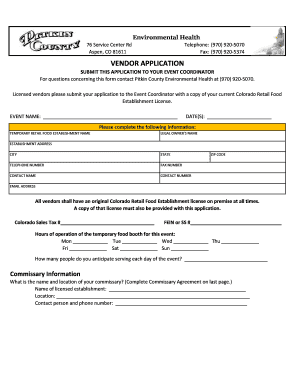
Get Vendor Application - City Of Aspen And Pitkin County
How it works
-

Open form follow the instructions
-

Easily sign the form with your finger
-

Send filled & signed form or save
How to fill out the Vendor Application - City of Aspen and Pitkin County online
The Vendor Application for the City of Aspen and Pitkin County is a crucial document for those planning to operate a temporary food establishment. This guide provides step-by-step instructions to help you complete the application process efficiently and effectively.
Follow the steps to successfully fill out your vendor application.
- Press the 'Get Form' button to access the vendor application and open it in your preferred online editor.
- In the event name field, enter the name of the event where you will be operating your temporary food establishment. In the date(s) field, indicate the date(s) of the event.
- Complete the business information sections, including the name of your temporary retail food establishment, legal owner's name, establishment address, city, state, telephone number, fax number, contact name, contact number, zip code, and email address.
- Ensure you have a current Colorado Retail Food Establishment License, as an original must be on-site during the event, and a copy must be attached to your application.
- Provide your Colorado Sales Tax number and Federal Employer Identification Number (FEIN) or Social Security Number (SS#).
- Specify the hours of operation for your temporary food booth for each day of the event by entering information in the designated fields.
- Indicate the estimated number of people you anticipate serving each day during the event.
- Complete the commissary information section by providing the name and location of your commissary, as well as contact information.
- List all food products and their specific sources in the menu section. If necessary, attach an additional sheet.
- Follow the instructions for food preparation and handling procedures, indicating how each food item will be prepared, reheated, and held at appropriate temperatures.
- Complete the hand-washing and food handling requirements section based on the nature of your booth/unit.
- Provide a diagram of your booth layout, indicating all required items, equipment, and processes.
- If applicable, fill out the commissary letter, ensuring you have the appropriate owner/operator information and signature.
- Review all information for accuracy. After confirming details, save your changes, download the application, print, or share it as needed.
Start filling out your vendor application online today to ensure compliance and a successful event.
Individuals hoping to receive a payment as part of the class-action settlement can file a claim here at any point through Aug. 25, 2023. Those who are filing a claim for a deleted account are asked to do the following: Go to the Settlement Website.
Industry-leading security and compliance
US Legal Forms protects your data by complying with industry-specific security standards.
-
In businnes since 199725+ years providing professional legal documents.
-
Accredited businessGuarantees that a business meets BBB accreditation standards in the US and Canada.
-
Secured by BraintreeValidated Level 1 PCI DSS compliant payment gateway that accepts most major credit and debit card brands from across the globe.