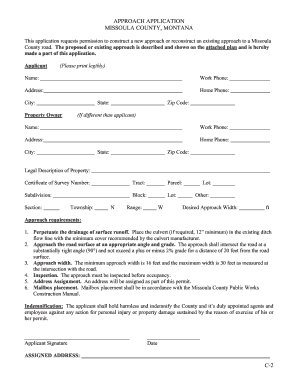
Approach is described and shown on the attached plan and is hereby made a part of this application. Applicant (Please print legibly) Name: Work Phone: Address: Home Phone: City: Property Owner State: Zip Code: (If different than applicant) Name: Work Phone: Address: Home Phone: City: State: Zip Code: Legal Description of Property: Certificate of Survey Number: Tract: Parcel: Subdivision: Block: Lot: Section: Township: N Range: W Lot: Other: Desired Approach Width:.

How it works
  • Open form

    Open form follow the instructions

  • Easily sign form

    Easily sign the form with your finger

  • Share form

    Send filled & signed form or save

How to fill out the Eco Bank Form Loan Filling online

This guide provides a step-by-step approach to completing the Eco Bank Form Loan Filling online. By following these instructions, users can easily navigate through the form and ensure all necessary information is accurately submitted.

Follow the steps to successfully fill out the Eco Bank Form Loan Filling.

  1. Press the ‘Get Form’ button to access the form and open it for editing.
  2. Carefully fill out the applicant section. Provide your full name, work phone, home phone, address, city, state, and zip code in the designated fields. Ensure all information is printed legibly.
  3. If the property owner is different from the applicant, fill out the property owner section with their complete details, similar to the applicant section.
  4. Next, enter the legal description of the property. This includes the certificate of survey number, tract, parcel, subdivision, block, lot, section, township, range, and additional lot information if necessary.
  5. Indicate the desired approach width in feet. Ensure it meets the specified requirements of a minimum and maximum width.
  6. Review the approach requirements listed carefully. Confirm that your approach design adheres to the drainage, angle, and grade specifications stated.
  7. Read and acknowledge the indemnification clause by preparing to sign in the applicant signature section. Add the current date next to your signature.
  8. Once completed, review all sections for accuracy. Save any changes made, and proceed to download, print, or share the form as needed.

Complete your documents online to ensure a smooth application process.

Get form

Experience a faster way to fill out and sign forms on the web. Access the most extensive library of templates available.

Related content

GSR_6K Filing Ecobank loan (1) - SEC.gov

We are pleased to advise that Ecobank Ghana has approved your company's credit ... To...

Learn more
Ghana EcoBank DCA Guarantee Evaluation - usaid

Mar 25, 2008 — FIGURE 2: GROWTH IN ECOBANK LENDING, 2002-2008 . ... value of collateral...

Learn more
Open market operation - Wikipedia

An open market operation (OMO) is an activity by a central bank to give (or take)...

Learn more
Questions & Answers

Get answers to your most pressing questions about US Legal Forms API.

Contact support

How to fill Ecobank account form?

Filling out an Ecobank account form requires you to provide personal information, including your identification details and contact information. Make sure to review the form for accuracy before submission, as errors can delay processing. For convenience, utilize the Eco Bank Form Loan Filling service to guide you through each step, ensuring you meet all requirements for a successful application.

To borrow a loan from Ecobank, you will need to use the specific loan code provided by the bank, which may change based on the type of loan you are seeking. This code is essential for processing your application through the Eco Bank Form Loan Filling platform. Always check the latest guidelines on Ecobank's official site or contact customer service for assistance. Ensuring you have the correct code will help streamline your borrowing experience.

The duration for online loan approval can vary based on several factors, including the lender's policies and the completeness of your application. Typically, you can expect a response within a few hours to a couple of days. To expedite the process, ensure your Eco Bank Form Loan Filling is thorough and accurate. This will help the bank assess your application more efficiently.

To fill out a bank loan form effectively, begin by gathering all necessary documents, such as identification and income verification. Next, carefully enter your personal details, including your name, address, and contact information. Ensure you provide accurate financial information to support your application. For a smoother process, consider using the Eco Bank Form Loan Filling tool, which simplifies the submission of your loan application.

When applying for a bank loan, you typically need to provide identification, proof of income, and details about your debts and assets. Additional documents may include bank statements and tax returns to support your application. Gathering these documents beforehand can streamline the Eco Bank Form Loan Filling process. For comprehensive guidance, consider using US Legal Forms to ensure you have everything in order.

An Ecobank Xpress loan is a quick and convenient loan option designed for individuals seeking fast access to funds. This loan typically offers a simple application process and flexible repayment terms. You can receive your funds promptly, which makes it an attractive option for urgent financial needs. If you need help with Eco Bank Form Loan Filling, US Legal Forms can guide you through the process.

To fill a bank loan form, start by gathering all necessary personal and financial information. You will need details like your income, employment status, and existing debts. Make sure to read the instructions carefully and provide accurate information. If you prefer a guided approach, consider using the US Legal Forms platform for assistance with Eco Bank Form Loan Filling.

To apply for the Ecobank Business Account, you will be required to upload the following documents: Identification documents. International Passport. National ID. Proof of Residence. Customer Photos. Personal Photo / Selfie. Business. Certificate of Residence.

Launch Ecobank mobile Select « Xpress Cash » Select « Point Xpress » or « GAB » If the choice is « Point Xpress », scan QR or type code manually. Enter amount (XAF 2000 – 250000) multiple of XAF 2000, select account to debit. Enter the transaction reason. Check your transaction information et enter your pin code.

How can I apply for an Ecobank loan? Request a loan at any of their locations near you. You can also use the Ecobank branch locator to discover the closest Ecobank branch to your location. You can access Ecobank's banking system by dialing *326#, which is the Ecobank's immediate rapid loan code.

Get This Form Now!

Use professional pre-built templates to fill in and sign documents online faster. Get access to thousands of forms.

If you believe that this page should be taken down, please follow our DMCA take down process here.

Get Eco Bank Form Loan Filling