Get Tendors
How it works
-

Open form follow the instructions
-

Easily sign the form with your finger
-

Send filled & signed form or save
How to fill out the Tendors online
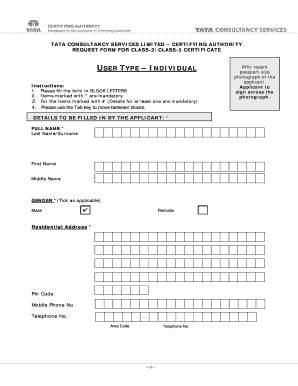
Filling out the Tendors accurately is essential for obtaining a Digital Signature Certificate. This guide provides clear, step-by-step instructions to assist users in completing the form online, ensuring all necessary details are included and correctly formatted.
Follow the steps to accurately complete the Tendors.
- Click ‘Get Form’ button to obtain the form and open it in the editor.
- Begin by filling in your full name in block letters. Ensure that the last name/surname is entered first, followed by your first name and middle name if applicable.
- Indicate your gender by ticking the relevant box. Options include male or female.
- Provide your residential address, ensuring to include your pin code. This information is crucial for identity verification.
- Enter your mobile phone number and any additional telephone numbers, making sure to include the area code where required.
- Affix a recent passport-sized photograph of yourself in the designated area. Remember to sign across the photograph for verification purposes.
- Read the declaration statement carefully. Confirm that you understand the instructions provided for obtaining the Digital Signature Certificate by including the date and place.
- Sign the application to validate your request, ensuring all information presented is accurate and complete.
- After filling out the form, you have options to save your changes, download the form for your records, print it, or share it electronically if needed.
- Finally, ensure the completed application form is submitted in person at the designated RA Office address.
Take the first step towards your Digital Signature Certificate by completing the Tendors online today.
To successfully obtain a tender, you typically need a well-prepared proposal that meets all specified requirements. Essential documents include your business license, financial statements, and relevant certifications. Additionally, demonstrating experience and reliability can significantly improve your chances. Using resources like US Legal Forms can help you gather the necessary documents and create a compelling proposal that stands out.