Loading
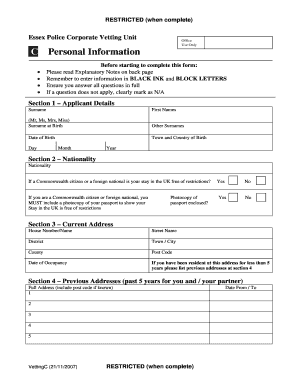
Get Vetting For Companies Form Sample
How it works
-

Open form follow the instructions
-

Easily sign the form with your finger
-

Send filled & signed form or save
How to fill out the Vetting For Companies Form Sample online
Completing the Vetting For Companies Form Sample is an essential step in the vetting process for individuals seeking access to sensitive information or employment within certain organizations. This guide provides clear, step-by-step instructions to assist users in accurately filling out the form online.
Follow the steps to successfully complete the form
- To obtain the form, click the 'Get Form' button to access the document. Ensure that your browser opens the form in an editable format that allows for online completion.
- Begin with Section 1 – Applicant Details. Fill in your surname, first names, any surnames at birth, and other surnames you have used. Include your date of birth, town and country of birth. Ensure all information is clear and completed in block letters using black ink.
- In Section 2 – Nationality, provide your nationality. If you are a Commonwealth citizen or foreign national, indicate whether your stay in the UK is free of restrictions and attach a photocopy of your passport if applicable.
- For Section 3 – Current Address, input your full address, including the house number/name, street name, district, town/city, county, and post code. Specify the date you began residing at this address.
- In Section 4 – Previous Addresses, list any previous addresses for the past five years if your current residence is less than five years. Ensure to include full details for each address.
- Proceed to Section 5 – Family Members and Co-Residents. Provide details for your spouse, partner, children, and any other residents at your address, noting any deceased individuals as required.
- Complete Section 6 – Previous Convictions and Caution. Answer all questions regarding past criminal offenses, including any fixed penalty notices, and provide relevant details if applicable.
- In Section 7 – Criminal Associates, indicate if you have any associations with individuals who may have criminal convictions or engage in criminal activities. If you answer ‘Yes’, provide the necessary details.
- For Section 8 – Extremist Groups, disclose any affiliations with groups that may use criminal means to achieve objectives. Provide details if applicable.
- In Section 9 – Personal Circumstances or Characteristics, identify any personal circumstances that could affect your suitability for the role you are applying for.
- Move to Section 10 – Financial Position where you will answer questions related to your financial history and indicate if specific sections do not apply to you.
- In Section 11 – Reference, provide details of two referees, including your current line manager or another reputable person if not employed.
- Fill in Section 12 – Role and Vetting Details, describing the role you will be undertaking within the organization and any previous police employment details.
- Optionally, add your contact details in Section 13 to facilitate communication regarding any queries about your form.
- Utilize Section 14 – Additional Information to provide any clarifying details regarding your application or the information you've provided.
- Finally, read and sign the Declaration in Section 15, affirming that all information is true and complete to the best of your knowledge. After completing the form, save your changes, download a copy, print it out if necessary, or share it with the relevant parties as instructed.
Start filling out your Vetting For Companies Form Sample online today to ensure a smooth vetting process.
An example of vetting could involve a company assessing a new supplier by reviewing their financial statements and customer feedback. This process helps the company make informed decisions about partnerships. You can use a Vetting For Companies Form Sample to ensure that you cover all necessary aspects of this evaluation.