Loading
Get Qssscxx
How it works
-

Open form follow the instructions
-

Easily sign the form with your finger
-

Send filled & signed form or save
How to use or fill out the Qssscxx online
Filling out the Qssscxx form correctly is essential for compliance with New York State tax regulations regarding qualified subchapter S subsidiaries. This guide provides a step-by-step method to help users complete the form efficiently and accurately.
Follow the steps to fill out the Qssscxx form online effectively.
- Press the ‘Get Form’ button to access the form and open it in your preferred editor.
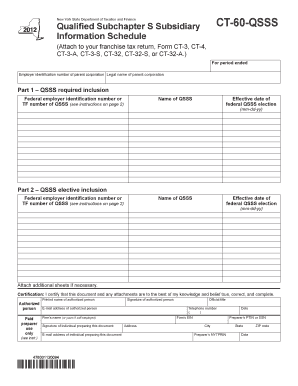
- Begin by providing the employer identification number of the parent corporation and its legal name. This information is crucial for identification purposes.
- In Part 1, fill in the federal employer identification number or TF number for each QSSS that is required inclusion on your franchise tax return. Ensure that you also include the name of the QSSS and the effective date of the federal QSSS election (format: mm-dd-yy).
- Proceed to Part 2 for QSSS elective inclusion. Here you will enter the federal employer identification number or TF number for the QSSS you elect to include, alongside its name and the effective date of the federal QSSS election.
- If necessary, attach additional sheets to provide any extra information about the QSSS or to complete your entries.
- In the certification section, an authorized person must print their name, sign, and date the document. Also, provide contact details including email and telephone number.
- If a paid preparer assisted in the preparation of the form, ensure that they fill out their section, including their name, firm’s name, and any required identification numbers.
- Review the completed Qssscxx form for accuracy, make any necessary changes, and then save your changes. You may also choose to download, print, or share the form as needed.
Complete your Qssscxx form online today to ensure proper filing with the New York State Department of Taxation and Finance.
To open a Qsys file, start by launching the Qssscxx application on your device. Use the 'File' menu to select 'Open' and locate the Qsys file you wish to access. Once you find the file, click on it and then select 'Open' to view its content. If you experience any difficulties, our support team is here to help you troubleshoot.