We use cookies to improve security, personalize the user experience, enhance our marketing activities (including cooperating with our marketing partners) and for other business use.
Click "here" to read our Cookie Policy. By clicking "Accept" you agree to the use of cookies. Read less
Read more
Accept
Loading
Form preview
  • US Legal Forms
  • Form Library
  • More Forms
  • More Uncategorized Forms
  • It 210 Form 2019

Get It 210 Form 2019

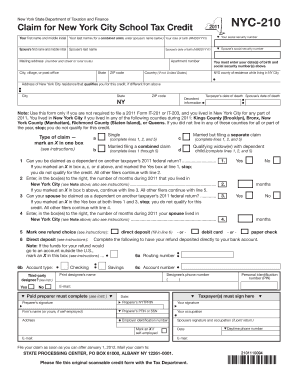
NYC-210 New York State Department of Taxation and Finance Claim for New York City School Tax Credit Your first name and middle initial Your last name for a combined claim enter spouse s name below Your date of birth MMDDYYYY Your social security number Spouse s first name and middle initial Spouse s last name Spouse s social security number Spouse s date of birth MMDDYYYY Mailing address number and street or rural route City village or post o.

How it works

  1. Open form

    Open form follow the instructions

  2. Easily sign form

    Easily sign the form with your finger

  3. Share form

    Send filled & signed form or save

How to fill out the It 210 Form 2019 online

Filing taxes can often seem overwhelming, but completing the It 210 Form 2019 online can simplify the process. This guide provides detailed, step-by-step instructions to assist you in filling out this important form for the New York City School Tax Credit.

Follow the steps to successfully fill out the It 210 Form 2019.

  1. Click ‘Get Form’ button to obtain the form and open it in the editor.
  2. Begin by entering your first name, middle initial, and last name, along with your date of birth and social security number. If applicable, include your spouse’s information in the designated fields.
  3. Provide your mailing address including apartment number, city, state, and ZIP code. Ensure all details are accurate to avoid any processing delays.
  4. Indicate your New York State county of residence while living in New York City and the address of your qualified New York City residence if it differs from your mailing address.
  5. Choose the type of claim you are making by marking an X in the appropriate box, ensuring you follow the instructions related to filing statuses such as Single, Married filing separately, or Combined claims.
  6. Answer question 1 regarding your claim status and proceed to complete additional lines based on your responses to prior questions. Be careful to follow the guidance that applies to your situation.
  7. Select your refund option and, if choosing direct deposit, fill in your routing number, account type, and account number diligently.
  8. Review all sections for accuracy and ensure you or your spouse sign the form in the designated area, confirming the information provided is correct.
  9. Finally, once you have completed the form and reviewed all entries, you can save your changes, download a copy for your records, print the form if needed, or share it as required.

Complete your documents online today for a smoother filing experience.

Get form

Experience a faster way to fill out and sign forms on the web. Access the most extensive library of templates available.
Get form

Related content

Form NYC-210, Claim for New York City School Tax...
Dec 18, 2020 — Can I Free File Form NYC-210? If your 2019 income is $69,000 or...
Learn more
Booklet - WV State Tax Department - WV.gov
Jan 15, 2019 — 2018 PERSONAL INCOME TAX IS DUE APRIL 15, 2019 ... page 27. If you do not...
Learn more
Template:COVID-19 pandemic data - Wikipedia
Centers for Disease Control and Prevention. Retrieved 24 April 2020. ^ CDC (11 February...
Learn more

Related links form

Itr Dd Form No No Download Needed Needed School Supplies Business Plan Credit Card Form With Tear Off Slip -secure Aug 2009 - Psychology Exeter Ac 2020 TALENT APPROVAL FORM - Curtin University

Questions & Answers

Get answers to your most pressing questions about US Legal Forms API.

Contact support

To mail your NYC-210 form, you should send it to the address specified in the instructions provided with the form. Typically, this is the New York State Department of Taxation and Finance's mailing address for tax returns. Make sure to check the most current mailing guidelines to avoid any delays. Using the IT 210 Form 2019, you can ensure your submission is completed accurately and on time.

To qualify for the NYC school tax credit, you must be a resident of New York City and have a child attending a public school, kindergarten through 12th grade. Additionally, your family income must fall within specific limits set by the city. This credit is designed to provide financial relief to families while supporting public education. The IT 210 Form 2019 can help you claim this credit if you meet the eligibility criteria.

The IT 210 Form 2019 is a tax form used by non-residents to report their income earned in New York State. This form allows non-residents to calculate their New York State tax liability based on income sourced from within the state. It is essential for ensuring compliance with tax regulations while maximizing potential credits or deductions. By using the IT 210 Form 2019, you can effectively manage your tax responsibilities as a non-resident.

To claim the tuition tax credit, complete the relevant sections on your tax return form. Ensure that you have all necessary documentation, such as receipts and the It 210 Form 2019 if you are in New York. Using a reliable platform like uslegalforms can simplify this process and help you maximize your credits.

To file the NYC-210 online, you can use tax preparation software or platforms like uslegalforms that guide you through the process. Simply enter your information, and the platform will help you generate the It 210 Form 2019. Make sure to double-check your entries for accuracy before submission.

Federal income tax forms should be mailed to the address specified in the instructions for each form. The mailing address can vary based on your location and whether you are including a payment. Be mindful to file your It 210 Form 2019 separately if you are claiming a credit specific to New York.

The form 210, specifically the NYC-210, is used to claim the New York City School Tax Credit. This credit benefits eligible residents by reducing their tax liability. It is important to complete the It 210 Form 2019 correctly to ensure you receive the credit you deserve.

You should mail the completed NYC-210 form to the New York City Department of Finance. The specific address can vary, so it's best to check the latest instructions on the official website. Remember to include the It 210 Form 2019 if you are filing for the tax credit.

Yes, you can file New York taxes online. Various platforms, including uslegalforms, simplify this process by allowing you to complete your tax forms electronically. When filing, make sure to include the It 210 Form 2019 if you qualify for the School Tax Credit.

Individuals who qualify for the New York City School Tax Credit file the NYC-210. This includes residents who meet specific income requirements and have children attending school. If you are eligible, ensure that you fill out the It 210 Form 2019 accurately to claim your credit.

Get This Form Now!

Use professional pre-built templates to fill in and sign documents online faster. Get access to thousands of forms.
Get form
If you believe that this page should be taken down, please follow our DMCA take down processhere.

Industry-leading security and compliance

US Legal Forms protects your data by complying with industry-specific security standards.
  • In businnes since 1997
    25+ years providing professional legal documents.
  • Accredited business
    Guarantees that a business meets BBB accreditation standards in the US and Canada.
  • Secured by Braintree
    Validated Level 1 PCI DSS compliant payment gateway that accepts most major credit and debit card brands from across the globe.
Get It 210 Form 2019
Get form
Form Packages
Adoption
Bankruptcy
Contractors
Divorce
Home Sales
Employment
Identity Theft
Incorporation
Landlord Tenant
Living Trust
Name Change
Personal Planning
Small Business
Wills & Estates
Packages A-Z
Form Categories
Affidavits
Bankruptcy
Bill of Sale
Corporate - LLC
Divorce
Employment
Identity Theft
Internet Technology
Landlord Tenant
Living Wills
Name Change
Power of Attorney
Real Estate
Small Estates
Wills
All Forms
Forms A-Z
Form Library
Customer Service
Terms of Service
Privacy Notice
Legal Hub
Content Takedown Policy
Bug Bounty Program
About Us
Help Portal
Legal Resources
Blog
Affiliates
Contact Us
Delete My Account
Site Map
Industries
Forms in Spanish
Localized Forms
State-specific Forms
Forms Kit
Legal Guides
Real Estate Handbook
All Guides
Prepared for You
Notarize
Incorporation services
Our Customers
For Consumers
For Small Business
For Attorneys
Our Sites
US Legal Forms
USLegal
FormsPass
pdfFiller
signNow
airSlate WorkFlow
DocHub
Instapage
Social Media
Call us now toll free:
+1 833 426 79 33
As seen in:
  • USA Today logo picture
  • CBC News logo picture
  • LA Times logo picture
  • The Washington Post logo picture
  • AP logo picture
  • Forbes logo picture
© Copyright 1997-2025
airSlate Legal Forms, Inc.
3720 Flowood Dr, Flowood, Mississippi 39232
Form Packages
Adoption
Bankruptcy
Contractors
Divorce
Home Sales
Employment
Identity Theft
Incorporation
Landlord Tenant
Living Trust
Name Change
Personal Planning
Small Business
Wills & Estates
Packages A-Z
Form Categories
Affidavits
Bankruptcy
Bill of Sale
Corporate - LLC
Divorce
Employment
Identity Theft
Internet Technology
Landlord Tenant
Living Wills
Name Change
Power of Attorney
Real Estate
Small Estates
Wills
All Forms
Forms A-Z
Form Library
Customer Service
Terms of Service
Privacy Notice
Legal Hub
Content Takedown Policy
Bug Bounty Program
About Us
Help Portal
Legal Resources
Blog
Affiliates
Contact Us
Delete My Account
Site Map
Industries
Forms in Spanish
Localized Forms
State-specific Forms
Forms Kit
Legal Guides
Real Estate Handbook
All Guides
Prepared for You
Notarize
Incorporation services
Our Customers
For Consumers
For Small Business
For Attorneys
Our Sites
US Legal Forms
USLegal
FormsPass
pdfFiller
signNow
airSlate WorkFlow
DocHub
Instapage
Social Media
Call us now toll free:
+1 833 426 79 33
As seen in:
  • USA Today logo picture
  • CBC News logo picture
  • LA Times logo picture
  • The Washington Post logo picture
  • AP logo picture
  • Forbes logo picture
© Copyright 1997-2025
airSlate Legal Forms, Inc.
3720 Flowood Dr, Flowood, Mississippi 39232