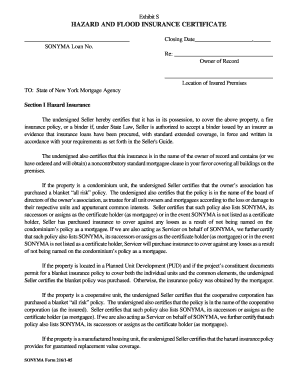
Get Sonyma And Hazard Insurance Form
How it works
-

Open form follow the instructions
-

Easily sign the form with your finger
-

Send filled & signed form or save
How to fill out the Sonyma and hazard insurance form online
Completing the Sonyma and hazard insurance form online can be straightforward if you follow the proper steps. This guide will provide you with clear, step-by-step instructions tailored to assist you in filling out each section of the form efficiently.
Follow the steps to complete your form accurately
- Click the 'Get Form' button to obtain the Sonyma and hazard insurance form and open it in your preferred online editor.
- Begin by entering the Sonyma loan number at the top of the form in the designated field. Ensure this number is accurate to avoid any delays.
- Next, fill in the closing date of the loan in the format provided. This must match the official closing documentation.
- In the section labeled 'Owner of Record', enter the full name of the property owner as it appears on legal documents.
- For the 'Location of Insured Premises', provide the address of the property that is insured, including the street, city, state, and zip code.
- Review Section I related to hazard insurance. Confirm that you have a fire insurance policy or binder as required and provide the details as necessary.
- Ensure that the insurance policy includes a noncontributory standard mortgagee clause in favor of the state of New York mortgage agency.
- If the property is part of a condominium, PUD, or cooperative unit, certify that the appropriate insurance policies are in effect by selecting or checking the relevant boxes.
- Move to Section II, concerning flood insurance. Confirm whether the property is located in a Special Flood Hazard Area (SFHA) and indicate whether flood insurance is required.
- If flood insurance is needed, provide details of the flood insurance policy. If it is not required, ensure you indicate that the property is not located within an SFHA.
- Finally, sign the form in the designated area, including your printed name and title, if applicable. Review all entered information for accuracy.
- Once the form is complete, you can save your changes, download a copy for your records, print it out, or share it as needed.
Complete your Sonyma and hazard insurance form online today to ensure your coverage is in place.
Your mortgage lender requests hazard insurance to protect their investment in your home. This type of insurance covers damage from specific risks, such as fire or severe weather, ensuring that your property retains its value. When you complete your SONYMA and hazard insurance form, this coverage is vital to meet lender requirements. By securing hazard insurance, you not only safeguard your home but also align with lending standards, making your mortgage process smoother.