Loading
Get Surrogate Legal Forms
How it works
-

Open form follow the instructions
-

Easily sign the form with your finger
-

Send filled & signed form or save
How to fill out the Surrogate Legal Forms online
Filling out surrogate legal forms online can seem daunting, but with the right guidance, it becomes a straightforward process. This guide will help you understand each section of the Surrogate Legal Forms and provide you with step-by-step instructions to complete them accurately.
Follow the steps to complete your Surrogate Legal Forms online.
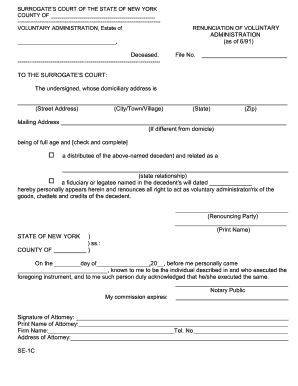
- Click ‘Get Form’ button to access the document and open it in your preferred editing platform.
- Begin by providing the county name where the decedent's estate is located in the designated space. Ensure that you enter the information accurately.
- Fill in the name of the deceased individual followed by the file number associated with the case.
- Enter your own domiciliary address, including street address, city or town, state, and zip code. If your mailing address differs from your domiciliary address, provide that information in the specified area.
- Identify your relationship to the decedent by checking the appropriate box and clearly stating your relationship in the provided space.
- As the renouncing party, print your name in the designated section to officially acknowledge your role in the renunciation process.
- In the notary section, leave space for the signature of a notary public to validate the document. Make sure to enter the date and any required information accurately.
- If represented by an attorney, include their signature, print name, firm name, address, and telephone number in the relevant sections.
- Review all entered information for accuracy and completeness. Once satisfied, you can save your changes and choose to download, print, or share the completed form.
Get started on completing your surrogate legal forms online today.
In simple terms, a surrogate is someone who carries a baby for another person or couple. This person helps bring a child into the world when the intended parents are unable to do so themselves. Using surrogate legal forms makes this process clear and legally sound, ensuring that everyone understands their roles and responsibilities.