Loading
Form preview
  • US Legal Forms
  • Form Library
  • More Forms
  • More Uncategorized Forms
  • Self-employment Ledger - State Sd

Get Self-employment Ledger - State Sd

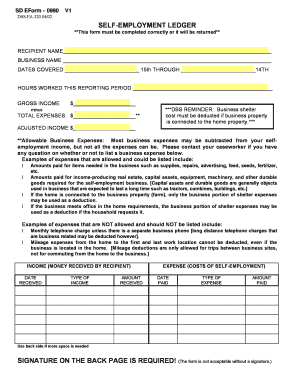
SD EForm 0990 V1 Complete and use the button at the end to print for mailing. HELP DSSEA320 04/02 SELFEMPLOYMENT LEDGER **This form must be completed correctly or it will be returned** RECIPIENT NAME.

How it works

  1. Open form

    Open form follow the instructions

  2. Easily sign form

    Easily sign the form with your finger

  3. Share form

    Send filled & signed form or save

How to fill out the Self-Employment Ledger - State Sd online

Filling out the Self-Employment Ledger - State Sd accurately is essential for proper record-keeping in self-employment. This guide provides clear, step-by-step instructions to assist you in completing the form online.

Follow the steps to successfully complete your Self-Employment Ledger.

  1. Click ‘Get Form’ button to initiate the process of obtaining the form. This will allow you to access the necessary document in an editable format.
  2. Begin by entering your name in the 'Recipient Name' field. Ensure the name matches the name associated with your self-employment.
  3. Next, fill in the 'Business Name' field with the name of your self-employed business. If you operate under a different name, use that name here.
  4. In the section for 'Dates Covered', specify the reporting period by writing the start date in the first blank and the end date in the second blank. The reporting period should cover the time frame for which you are reporting income and expenses.
  5. Input the total 'Hours Worked This Reporting Period' in the respective field. Be honest and accurate about the time invested in your business operations.
  6. Enter your 'Gross Income' for the reporting period, which is the total income before any deductions. Make sure this is accurate to reflect your earnings accurately.
  7. Deduct 'Total Expenses' from your gross income to find your adjusted income. Fill in the total expenses that are allowable according to the guidelines provided.
  8. In the 'Income' section, detail each type of income received by adding the date received, type of income, and amount received. Use the back side if additional space is necessary.
  9. Similarly, in the 'Expense' section, detail each cost of self-employment. Fill in the date paid, type of expense, and amount paid for tangible clarity.
  10. A signature is required at the end of the form. Ensure you sign on the designated space at the back page and include the date signed.
  11. Once all fields have been completed, you can save changes, download the form, print it for mailing, or share it as necessary.

Complete your Self-Employment Ledger online today to ensure your financial records are accurate and up-to-date.

Get form

Experience a faster way to fill out and sign forms on the web. Access the most extensive library of templates available.
Get form

Related content

SELF-EMPLOYMENT LEDGER
Allowable Business Expenses: Most business expenses may be subtracted from your self...
Learn more
Self Employment Ledger Template Florida
Aug 21, 2020 — to see guide self employment ledger template florida as you such as....
Learn more
Boeing CH-47 Chinook - Wikipedia
The Boeing CH-47 Chinook is an American twin-engined, tandem rotor, heavy-lift helicopter...
Learn more

Related links form

Missouri Department Of Health And Senior Services Tuberculosis Testing Record Form Body Art Facility Inspection Report Form - Michigan Phpprobid Pa Dog License 2020

Questions & Answers

Get answers to your most pressing questions about US Legal Forms API.

Contact support

employment ledger is a detailed record that helps you track your income and expenses as a selfemployed individual. By maintaining a selfemployment ledger State Sd, you can organize your financial data efficiently, making it easier to prepare your taxes and evaluate your business performance. This tool simplifies financial management, ensuring that you have a clear overview of your earnings and expenditures throughout the year.

You can provide proof of self-employment by presenting various documents, including tax returns, invoices, and contracts that show your work. A well-maintained Self-Employment Ledger - State Sd will also serve as a strong piece of evidence, as it systematically records your income and expenses over time. This documentation helps establish your credibility as a self-employed individual.

To write proof of self-employment, create a document that outlines your business activities, income sources, and the duration of your self-employment. Include your business name, contact information, and any relevant tax identification numbers. You may also attach supporting documents, such as invoices or bank statements, to reinforce your claims. The Self-Employment Ledger - State Sd from uslegalforms can assist you in maintaining accurate records that serve as proof of your self-employment when needed.

To fill out a self-employment ledger, start by gathering all your income sources and expenses related to your business. Record each income entry along with the date and amount, followed by your business expenses, categorizing them for clarity. Utilizing a structured format ensures accuracy and organization, making it easier to track your finances. For efficient management, consider using the Self-Employment Ledger - State Sd available on uslegalforms.

To document self-employment, maintain a detailed self-employment ledger that includes all income and expenses related to your business. Collect receipts, invoices, and any other relevant documentation that supports your earnings. This organized approach is crucial for tax purposes and can be easily managed with tools offered by USLegalForms.

In South Dakota, self-employment tax generally consists of Social Security and Medicare taxes, which are currently set at a combined rate of 15.3%. This tax applies to your net earnings from self-employment. Keeping accurate records in your self-employment ledger will help you calculate this tax accurately when filing your returns.

Yes, you can create your own self-employment ledger tailored to your needs. Use a simple spreadsheet or accounting software to input your income and expenses. However, utilizing a pre-designed template from USLegalForms can save you time and ensure you include all necessary details for proper record-keeping.

Tracking income as a self-employed individual requires regular updates to your self-employment ledger. Record every payment received, along with the date and source. Using accounting software or templates from USLegalForms can help you manage and monitor your finances effectively, ensuring nothing slips through the cracks.

To record self-employment income, document each payment you receive by noting the date, amount, and source of income. Keep receipts or invoices as proof of these transactions. Regularly updating your self-employment ledger helps you keep track of your finances and prepare for tax time effectively.

Making a self-employment ledger involves gathering your financial information and organizing it clearly. You can create a spreadsheet or use accounting software, listing your income and expenses. Make sure to categorize each entry for easier tracking, and consider using a self-employment ledger template from USLegalForms for added convenience.

Get This Form Now!

Use professional pre-built templates to fill in and sign documents online faster. Get access to thousands of forms.
Get form
If you believe that this page should be taken down, please follow our DMCA take down processhere.
Get Self-Employment Ledger - State Sd
Get form
  • Adoption
  • Bankruptcy
  • Contractors
  • Divorce
  • Home Sales
  • Employment
  • Identity Theft
  • Incorporation
  • Landlord Tenant
  • Living Trust
  • Name Change
  • Personal Planning
  • Small Business
  • Wills & Estates
  • Packages A-Z
  • Affidavits
  • Bankruptcy
  • Bill of Sale
  • Corporate - LLC
  • Divorce
  • Employment
  • Identity Theft
  • Internet Technology
  • Landlord Tenant
  • Living Wills
  • Name Change
  • Power of Attorney
  • Real Estate
  • Small Estates
  • Wills
  • All Forms
  • Forms A-Z
  • Form Library
  • Legal Hub
  • About Us
  • Help Portal
  • Legal Resources
  • Blog
  • Affiliates
  • Contact Us
  • Delete My Account
  • Site Map
  • Industries
  • Forms in Spanish
  • Localized Forms
  • State-specific Forms
  • Forms Kit
  • Real Estate Handbook
  • All Guides
  • Notarize
  • Incorporation services
  • For Consumers
  • For Small Business
  • For Attorneys
  • USLegal
  • FormsPass
  • pdfFiller
  • signNow
  • altaFlow
  • DocHub
  • Instapage
Form Packages
  • Adoption
  • Bankruptcy
  • Contractors
  • Divorce
  • Home Sales
  • Employment
  • Identity Theft
  • Incorporation
  • Landlord Tenant
  • Living Trust
  • Name Change
  • Personal Planning
  • Small Business
  • Wills & Estates
  • Packages A-Z
Form Categories
  • Affidavits
  • Bankruptcy
  • Bill of Sale
  • Corporate - LLC
  • Divorce
  • Employment
  • Identity Theft
  • Internet Technology
  • Landlord Tenant
  • Living Wills
  • Name Change
  • Power of Attorney
  • Real Estate
  • Small Estates
  • Wills
  • All Forms
  • Forms A-Z
  • Form Library
Customer Service
  • Legal Hub
  • About Us
  • Help Portal
  • Legal Resources
  • Blog
  • Affiliates
  • Contact Us
  • Delete My Account
  • Site Map
  • Industries
  • Forms in Spanish
  • Localized Forms
  • State-specific Forms
  • Forms Kit
Legal Guides
  • Real Estate Handbook
  • All Guides
Prepared for you
  • Notarize
  • Incorporation services
Our Customers
  • For Consumers
  • For Small Business
  • For Attorneys
Our Sites
  • USLegal
  • FormsPass
  • pdfFiller
  • signNow
  • altaFlow
  • DocHub
  • Instapage
Social Media
Call us now toll free:
+1 833 426 79 33
As seen in:
© Copyright 1999-2026 airSlate Legal Forms, Inc. 3720 Flowood Dr, Flowood, Mississippi 39232
  • Your Privacy Choices
  • Terms of Service
  • Privacy Notice
  • Content Takedown Policy
  • Bug Bounty Program