Loading
Form preview
  • US Legal Forms
  • Form Library
  • More Forms
  • More Uncategorized Forms
  • Sc Notice To Reject Form

Get Sc Notice To Reject Form

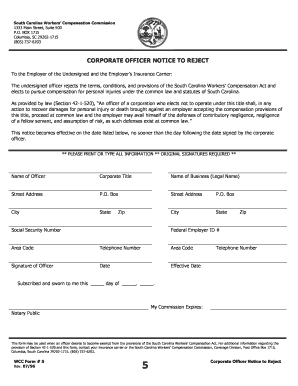
South Carolina Workers Compensation Commission 1333 Main Street, Suite 500 P.O. BOX 1715 Columbia, SC 29202-1715 (803) 737-6203 CORPORATE OFFICER NOTICE TO REJECT To the Employer of the Undersigned.

How it works

  1. Open form

    Open form follow the instructions

  2. Easily sign form

    Easily sign the form with your finger

  3. Share form

    Send filled & signed form or save

How to fill out the Sc Notice To Reject Form online

Filling out the Sc Notice To Reject Form is a crucial step for corporate officers seeking exemption from the South Carolina Workers' Compensation Act. This guide provides clear, step-by-step instructions to help you complete the form accurately and efficiently.

Follow the steps to complete the Sc Notice To Reject Form online.

  1. Press the ‘Get Form’ button to access the document and open it in your preferred online editor.
  2. Begin by entering the 'Name of Officer' in the designated field. Ensure that you provide your full legal name.
  3. In the 'Corporate Title' section, specify your official position within the organization.
  4. Complete the 'Name of Business (Legal Name)' field with the registered name of the corporation.
  5. Fill in the 'Street Address' and 'P.O. Box' fields with the physical address where the business is located.
  6. Provide the 'City,' 'State,' and 'Zip' code that correspond to the business address.
  7. Input the 'Social Security Number' and 'Federal Employer ID #' as required for identification purposes.
  8. Enter your 'Area Code' and 'Telephone Number' for contact information.
  9. Include your 'Signature' as the corporate officer, then input the 'Date' when you sign the document.
  10. Specify the 'Effective Date,' which cannot be earlier than one day following your signature.
  11. Complete the 'Notary Public' section by signing and dating the document in the appropriate fields.
  12. Finally, review the completed form for any errors or missing information. Once everything is accurate, you can save changes, download, print, or share the form as needed.

Start filling out the Sc Notice To Reject Form online today to ensure compliance and pursue your preferred compensation methods.

Get form

Experience a faster way to fill out and sign forms on the web. Access the most extensive library of templates available.
Get form

Related content

SC Officer Exclusion Form
WCC Form # 5. Rev. 05/2013. 5. Corporate Officer Notice to Reject. South Carolina Workers'...
Learn more
Probate - South Carolina Forms Index - LibGuides...
Aug 31, 2020 — These Probate Court forms are available from the website of the South...
Learn more
State of South Carolina Invitation to Bid...
Nov 20, 2015 — You must submit a signed copy of this form with Your Offer. By signing...
Learn more

Related links form

Namfi Application Form 2020 Vmux Diagnostics Form 2020 Jetro Membership 2020 Mc 230

Questions & Answers

Get answers to your most pressing questions about US Legal Forms API.

Contact support

A cancellation notice is a document that officially communicates the termination of a contract or agreement. In the context of loans, it informs all parties that the borrower has chosen to rescind the agreement based on their right to cancel. The SC Notice To Reject Form serves as an essential tool for borrowers to exercise this right effectively, ensuring clarity and legal protection.

Filing a workers' comp claim in South Carolina involves several steps. First, report your injury to your employer as soon as possible. Then, complete the necessary paperwork, which may include the SC Notice To Reject Form to indicate your intention to reject a settlement if applicable. Using platforms like US Legal Forms can simplify this process and ensure you have all the required documents.

On the Design tab, select Watermark. Choose a pre-configured watermark, like DRAFT, CONFIDENTIAL, or DO NOT COPY. For placing a logo or image, Select Watermark > Custom Watermark > Picture watermark > Select Picture. On the same menu you can create a custom text watermark.

Use a custom watermark On the Design tab, select Watermark > Custom Watermark. Choose Picture Watermark and select a picture, or choose Text watermark and type your watermark text in the Text box. Click OK.

Microsoft Word has a special feature called a watermark. A watermark is a light and faded image of text, picture, and logo that appears behind the main content of the document. Basically, it is a lighter shade in the text, so that reader can read the document very easily.

Choose Tools > Edit PDF > Watermark > Add.

How To Watermark PDF Pages Online For Free Step 1: Select your PDF document. Step 2: Add Text Watermark. Click the Add Text button at the top of the PDF page. ... Step 3: Change text size, rotation and location on page. ... Step 4: Change text color, transparency and font family.

Get This Form Now!

Use professional pre-built templates to fill in and sign documents online faster. Get access to thousands of forms.
Get form
If you believe that this page should be taken down, please follow our DMCA take down processhere.

Industry-leading security and compliance

US Legal Forms protects your data by complying with industry-specific security standards.
  • In businnes since 1997
    25+ years providing professional legal documents.
  • Accredited business
    Guarantees that a business meets BBB accreditation standards in the US and Canada.
  • Secured by Braintree
    Validated Level 1 PCI DSS compliant payment gateway that accepts most major credit and debit card brands from across the globe.
Get Sc Notice To Reject Form
Get form
  • Adoption
  • Bankruptcy
  • Contractors
  • Divorce
  • Home Sales
  • Employment
  • Identity Theft
  • Incorporation
  • Landlord Tenant
  • Living Trust
  • Name Change
  • Personal Planning
  • Small Business
  • Wills & Estates
  • Packages A-Z
  • Affidavits
  • Bankruptcy
  • Bill of Sale
  • Corporate - LLC
  • Divorce
  • Employment
  • Identity Theft
  • Internet Technology
  • Landlord Tenant
  • Living Wills
  • Name Change
  • Power of Attorney
  • Real Estate
  • Small Estates
  • Wills
  • All Forms
  • Forms A-Z
  • Form Library
  • Legal Hub
  • About Us
  • Help Portal
  • Legal Resources
  • Blog
  • Affiliates
  • Contact Us
  • Delete My Account
  • Site Map
  • Industries
  • Forms in Spanish
  • Localized Forms
  • State-specific Forms
  • Forms Kit
  • Real Estate Handbook
  • All Guides
  • Notarize
  • Incorporation services
  • For Consumers
  • For Small Business
  • For Attorneys
  • USLegal
  • FormsPass
  • pdfFiller
  • signNow
  • altaFlow
  • DocHub
  • Instapage
Form Packages
  • Adoption
  • Bankruptcy
  • Contractors
  • Divorce
  • Home Sales
  • Employment
  • Identity Theft
  • Incorporation
  • Landlord Tenant
  • Living Trust
  • Name Change
  • Personal Planning
  • Small Business
  • Wills & Estates
  • Packages A-Z
Form Categories
  • Affidavits
  • Bankruptcy
  • Bill of Sale
  • Corporate - LLC
  • Divorce
  • Employment
  • Identity Theft
  • Internet Technology
  • Landlord Tenant
  • Living Wills
  • Name Change
  • Power of Attorney
  • Real Estate
  • Small Estates
  • Wills
  • All Forms
  • Forms A-Z
  • Form Library
Customer Service
  • Legal Hub
  • About Us
  • Help Portal
  • Legal Resources
  • Blog
  • Affiliates
  • Contact Us
  • Delete My Account
  • Site Map
  • Industries
  • Forms in Spanish
  • Localized Forms
  • State-specific Forms
  • Forms Kit
Legal Guides
  • Real Estate Handbook
  • All Guides
Prepared for you
  • Notarize
  • Incorporation services
Our Customers
  • For Consumers
  • For Small Business
  • For Attorneys
Our Sites
  • USLegal
  • FormsPass
  • pdfFiller
  • signNow
  • altaFlow
  • DocHub
  • Instapage
Social Media
Call us now toll free:
+1 833 426 79 33
As seen in:
© Copyright 1999-2026 airSlate Legal Forms, Inc. 3720 Flowood Dr, Flowood, Mississippi 39232
  • Your Privacy Choices
  • Terms of Service
  • Privacy Notice
  • Content Takedown Policy
  • Bug Bounty Program