Loading
Get Ambulance Inspection Form
How it works
-

Open form follow the instructions
-

Easily sign the form with your finger
-

Send filled & signed form or save
How to fill out the Ambulance Inspection Form online
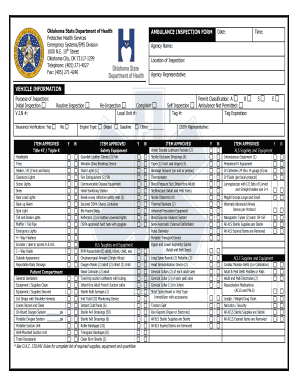
This guide provides detailed instructions on completing the Ambulance Inspection Form online. Follow these steps to ensure your form is filled out accurately and completely.
Follow the steps to fill out the Ambulance Inspection Form effectively.
- Click ‘Get Form’ button to access the Ambulance Inspection Form and open it in the online editor.
- Input the date of inspection in the designated field.
- Enter the time of inspection in the corresponding field.
- Provide the agency name responsible for the ambulance in the specified section.
- Fill in the location of the inspection where it was conducted.
- Record the name of the agency representative overseeing the inspection.
- Select the purpose of the inspection by checking one of the options: Initial Inspection, Routine Inspection, Re-Inspection, or Complaint.
- Enter the Vehicle Identification Number (V.I.N #) for the ambulance in the appropriate field.
- Indicate whether insurance verification is available, selecting 'Yes' or 'No'.
- In the 'Item Approved' section, check 'Yes' or 'No' for each required safety equipment item, including items like ALS Supplies, safety equipment, and medical supplies.
- Document any deficiencies or remarks in the remarks and comments section, ensuring clarity and accuracy.
- Review all information for completeness and accuracy before submission.
- Save your changes, then download, print, or share the form as needed.
Complete your Ambulance Inspection Form online today for a streamlined inspection process.
Related links form
MI Thoreson McCosh Tech 3 Dryer Instruction Manual IB200205 2006
PA Izzie's Gifts Of Hope Foundation Isabelle Christenson Memorial Scholarship 2016
SC Forest Lake Presbyterian Church Fun Daze Field Trip Permission And Medical Release Form 2013
TX Westwood Independent School District Views Of 3-Dimensional Objects 2014
The key steps in the inspection process include planning, conducting a visual assessment, testing equipment functionality, ensuring compliance with regulations, and documenting findings. Each step is essential for maintaining the safety and readiness of an ambulance. Using an Ambulance Inspection Form can streamline these steps and provide a clear record of your inspection activities.