Loading
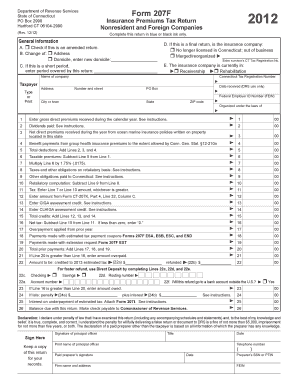
Get Form 207f, 2012 Insurance Premiums Tax Return ... - Ct.gov - Ct
How it works
-

Open form follow the instructions
-

Easily sign the form with your finger
-

Send filled & signed form or save
How to fill out the Form 207F, 2012 Insurance Premiums Tax Return online
This guide provides a clear and supportive approach to completing the Form 207F, particularly for nonresident and foreign companies reporting their insurance premiums tax. Whether you are familiar with tax returns or new to the process, these instructions will help you navigate each section effectively.
Follow the steps to complete your tax return accurately.
- Click ‘Get Form’ button to obtain the form and open it for editing.
- Complete the general information section at the top of the form. Make sure to check if this is an amended return, and provide any changes to your address or domicile if applicable. If this is a final return, indicate the reason and enter relevant details.
- In the taxpayer information area, fill in the name of your company, your Connecticut Tax Registration Number, address, and Federal Employer ID Number (FEIN). Ensure all details are accurate and legible.
- For gross direct premiums, enter the total amount received during the calendar year on Line 1. Include all relevant information but exclude annuity considerations and reinsurance premiums. Follow the guidance in the instructions for clarification.
- Enter the dividends paid to policyholders on Line 2. Be mindful not to include dividends related to stock ownership.
- If applicable, report net direct premiums for ocean marine insurance on Line 3, followed by any eligible benefit payments on Line 4.
- Calculate and enter total deductions on Line 5 by adding Lines 2, 3, and 4 together.
- Determine the taxable premiums by subtracting Line 5 from Line 1 and enter the result on Line 6.
- Multiply the amount on Line 6 by 1.75% and enter the result on Line 7. Complete calculations for any retaliatory taxes on Line 8 and other obligations on Line 9 as instructed.
- Calculate the final tax, comparing Lines 7 and 10, and enter the larger value on Line 11.
- Complete any credits on Lines 12 through 15, and calculate the net tax on Line 16.
- Report any overpayments or payments made on previous tax amounts in the appropriate sections, ensuring the summation on Line 20 is accurate.
- If you have a refund, fill in direct deposit information on Lines 22c to 22f to expedite the process.
- Finalize the return with signatures required from the principal officer and any paid preparer, ensuring dates are filled out correctly.
- Review the completed form for accuracy, save your changes, and prepare to submit it as instructed, either by mail or by electronic payment methods available.
Begin filing your Form 207F online today to ensure timely compliance with Connecticut tax obligations.
You're not required to purchase health insurance in Connecticut, but the Affordable Care Act does have a mandate for insurance coverage at the federal level.
Industry-leading security and compliance
US Legal Forms protects your data by complying with industry-specific security standards.
-
In businnes since 199725+ years providing professional legal documents.
-
Accredited businessGuarantees that a business meets BBB accreditation standards in the US and Canada.
-
Secured by BraintreeValidated Level 1 PCI DSS compliant payment gateway that accepts most major credit and debit card brands from across the globe.