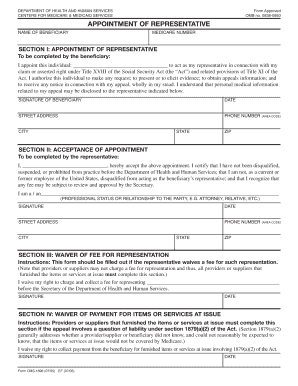
Get Wellcare Appointment Of Representative Form
How it works
-

Open form follow the instructions
-

Easily sign the form with your finger
-

Send filled & signed form or save
How to fill out the Wellcare Appointment Of Representative Form online
This guide provides detailed instructions on completing the Wellcare Appointment Of Representative Form online. Ensuring accurate completion of this form is essential for facilitating representation in Medicare appeals.
Follow the steps to fill out the form effectively.
- Use the ‘Get Form’ button to obtain the Wellcare Appointment Of Representative Form and open it for editing.
- In Section I, provide the name of the beneficiary and their Medicare number. Ensure that the beneficiary's details are entered accurately to avoid processing delays.
- The beneficiary must appoint a representative by entering their name and signing in the designated area. Include the date of signing, as well as the beneficiary's street address, phone number, city, state, and ZIP code.
- In Section II, the appointed representative must enter their name, accept the appointment, and confirm their professional status or relationship to the beneficiary. The representative should sign and date the form, along with providing their contact information.
- If applicable, complete Section III to waive any fees for representation. The representative must sign and date this section to confirm the waiver.
- If the situation involves any payment for items or services, complete Section IV, which must be signed and dated by the representative.
- Review all sections for completeness and accuracy. Once verified, you can save the changes, download the document, print it, or share it as needed.
Complete your Wellcare Appointment Of Representative Form online to effectively manage your Medicare appeal process.
Filling out an appointment of representative form involves providing your information and the details of the representative you wish to appoint. You will need to include their name, address, and relationship to you. Make sure to sign the form to validate your appointment. To simplify this process, you can use the Wellcare Appointment Of Representative Form on US Legal Forms, which offers a user-friendly experience and helps ensure accuracy.