Get Examination Permit
How it works
-

Open form follow the instructions
-

Easily sign the form with your finger
-

Send filled & signed form or save
How to fill out the Examination Permit online
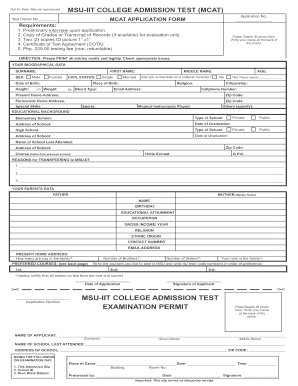
This guide offers a clear, step-by-step approach to filling out the Examination Permit online. By following these instructions, users can easily navigate the form and ensure all necessary information is accurately provided.
Follow the steps to complete your Examination Permit effectively.
- Click ‘Get Form’ button to retrieve the Examination Permit and open it in the online editor.
- Begin filling in your biographical data, including your surname, first name, middle name, date of birth, place of birth, and other relevant information. Ensure all entries are printed neatly and legibly.
- Indicate your sex and civil status by checking the appropriate box. Fill out your citizenship, email address, and cellphone number accurately.
- Input your present and permanent home address, including the corresponding zip codes. This information is crucial for your identification.
- Provide details about your educational background, including the name of the last school attended, the type of school, and the date of graduation. Be sure to include your course, units earned, and GPA if applicable.
- In the section for reasons for transferring to MSU-IIT, articulate your motivations clearly and concisely.
- Complete the parents' data section, ensuring you list both parents' names, birthdays, educational attainments, occupations, gross income, religion, ethnic origin, contact numbers, and email addresses.
- Indicate your family composition, including the number of brothers and sisters, and rank in the family to provide a complete picture of your background.
- Select your preferred courses from the provided list, writing them in order of preference along with their code numbers.
- Certify that all entries on the form are true and correct by providing your signature and the date of application at the designated space.
- Once you have filled in all necessary fields, ensure to save changes, download a copy, and print or share the Examination Permit as needed.
Complete your Examination Permit online today for a smooth admission process.
The easiest way to pass a permit test is to focus on understanding key concepts rather than memorizing answers. Start by reviewing the driver's manual provided by the state, and then use online resources or apps that offer interactive quizzes related to the Examination Permit. Engaging with these tools allows you to learn in a fun and effective manner, making the study process less daunting. Incorporating these strategies can lead you to a successful test outcome.