Loading
Form preview
  • US Legal Forms
  • Form Library
  • More Forms
  • More Uncategorized Forms
  • Asic Form 388 In Ms Word

Get Asic Form 388 In Ms Word

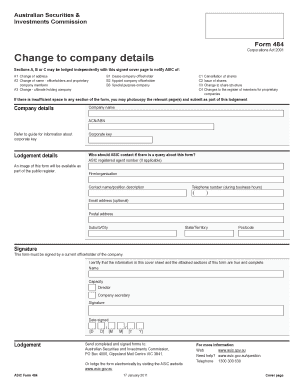
Cover page to notify ASIC of: A1 Change of address A2 Change of name - officeholders and proprietary company members A3 Change - ultimate holding company B1 Cease company officeholder B2 Appoint company officeholder B3 Special purpose company C1 Cancellation of shares C2 Issue of shares C3 Change to share structure C4 Changes to the register of members for proprietary companies If there is insufficient space in any section of the form, you may photocopy the relevant page(s) and submit a.

How it works

  1. Open form

    Open form follow the instructions

  2. Easily sign form

    Easily sign the form with your finger

  3. Share form

    Send filled & signed form or save

How to fill out the Asic Form 388 in Ms Word online

Filling out the ASIC Form 388 in MS Word online can streamline your process of notifying changes to company details. This guide provides a step-by-step approach to expertly complete each section of the form while ensuring accuracy and compliance.

Follow the steps to effectively complete the form.

  1. Press the ‘Get Form’ button to access the form and open it in your editor.
  2. Review the cover page and enter your company's name and Australian Company Number (ACN) or Australian Business Number (ABN) as required.
  3. Fill out the corporate key if lodging the form online. If not, include it on the cover page.
  4. In the lodgement details section, specify who ASIC should contact if there are inquiries regarding the form. Provide the ASIC registered agent number if relevant.
  5. Complete the personal and contact details for the firm or organization, including the contact name, telephone number, email address (optional), and postal address.
  6. In Section A, indicate the nature of changes such as a change of address, name changes, or details regarding ultimate holding companies. Attach additional pages if necessary.
  7. If applicable, complete Section B for changes to company officeholders, ensuring to include necessary details for each officeholder's cessation or appointment.
  8. Complete Section C for share-related changes, including cancellations, issues of shares, or any changes in the register of members.
  9. Ensure you provide the signature of a current officeholder, certifying that the information submitted is true and complete along with the date signed.
  10. Once all sections are filled out, save your changes, and prepare to download, print, or share the completed form.

Complete your documents online today for a smoother filing experience!

Get form

Experience a faster way to fill out and sign forms on the web. Access the most extensive library of templates available.
Get form

Related content

EX-10.17 - SEC.gov
This ASIC Development and Supply Agreement (“Agreement”) is made and ... When used in...
Learn more
Lightweight and Secure PUF Key Storage Using ......
2 MIT Cambridge, MA, USA devadas@mit.edu. Abstract. ... Distribution Shaping, Machine...
Learn more
Touch System Programming Guide - Elo ......
Bold is used to emphasize a word or phrase, including definitions ... A touch system is...
Learn more

Related links form

Rt3198 Kbc Withdrawal Form Gross Profit Multiplier Chart Red And White Ub 04 Form Pdf

Questions & Answers

Get answers to your most pressing questions about US Legal Forms API.

Contact support

Lodging documents with ASIC can be done online or via mail, depending on the type of document. For electronic submissions, visit the ASIC website and follow the prompts for document lodgment. If you prefer using MS Word, you can prepare your ASIC form 388 in that format before submitting it according to your chosen method.

Self-reporting to ASIC involves notifying them about any compliance issues or breaches in your company’s operations. You can do this by completing the relevant forms, including form 388 if necessary, and submitting them through the ASIC website. Utilizing our platform can help ensure that your self-reporting is thorough and accurate.

To lodge form 388 with ASIC, ensure you have filled out the form completely and correctly. You can submit it electronically through the ASIC online portal or send it via post. Using ASIC form 388 in MS Word makes it easy to fill out and save for your records before submission.

Form 384 ASIC is a different form that is used for notifying ASIC about changes in company structure or control. While it serves a distinct purpose, it is important to differentiate it from form 388, which deals with basic company details. If you need to manage multiple forms, consider using our platform for convenient access and guidance.

Form 388 is a document used for notifying ASIC about changes to a company's details, such as registered office address or officeholders. This form is essential for maintaining up-to-date records with ASIC. Completing ASIC form 388 in MS Word can streamline the process, making it easier to manage your company's information.

To lodge ASIC form 388, you must first complete the form accurately. You can download the form in MS Word format from a reliable source, ensuring it meets ASIC's requirements. Once completed, you can submit the form online through the ASIC website, or mail it directly to their office, depending on your preference.

Financial reports are available on ASIC's public register. To locate a specific company's financial report you can complete a company name search on Organisations & Business Names at ASIC Connect.

Large charities must have their financial report audited. The auditor's report must be submitted as part of the financial report in the Annual Information Statement. The audit must be conducted by: a registered company auditor (as defined by the Corporations Act 2001)

Section 319 of the Corporations Act requires a disclosing entity or registered managed investment scheme to lodge the complete financial reports within three months after the end of the financial year. All other companies must lodge their financial reports within four months after the end of the financial year.

Financial statements and reports must be lodged each year by: public companies. a Tier 2 public company limited by guarantee. registered schemes.

Get This Form Now!

Use professional pre-built templates to fill in and sign documents online faster. Get access to thousands of forms.
Get form
If you believe that this page should be taken down, please follow our DMCA take down processhere.
Get Asic Form 388 In Ms Word
Get form
  • Adoption
  • Bankruptcy
  • Contractors
  • Divorce
  • Home Sales
  • Employment
  • Identity Theft
  • Incorporation
  • Landlord Tenant
  • Living Trust
  • Name Change
  • Personal Planning
  • Small Business
  • Wills & Estates
  • Packages A-Z
  • Affidavits
  • Bankruptcy
  • Bill of Sale
  • Corporate - LLC
  • Divorce
  • Employment
  • Identity Theft
  • Internet Technology
  • Landlord Tenant
  • Living Wills
  • Name Change
  • Power of Attorney
  • Real Estate
  • Small Estates
  • Wills
  • All Forms
  • Forms A-Z
  • Form Library
  • Legal Hub
  • About Us
  • Help Portal
  • Legal Resources
  • Blog
  • Affiliates
  • Contact Us
  • Delete My Account
  • Site Map
  • Industries
  • Forms in Spanish
  • Localized Forms
  • State-specific Forms
  • Forms Kit
  • Real Estate Handbook
  • All Guides
  • Notarize
  • Incorporation services
  • For Consumers
  • For Small Business
  • For Attorneys
  • USLegal
  • FormsPass
  • pdfFiller
  • signNow
  • altaFlow
  • DocHub
  • Instapage
Form Packages
  • Adoption
  • Bankruptcy
  • Contractors
  • Divorce
  • Home Sales
  • Employment
  • Identity Theft
  • Incorporation
  • Landlord Tenant
  • Living Trust
  • Name Change
  • Personal Planning
  • Small Business
  • Wills & Estates
  • Packages A-Z
Form Categories
  • Affidavits
  • Bankruptcy
  • Bill of Sale
  • Corporate - LLC
  • Divorce
  • Employment
  • Identity Theft
  • Internet Technology
  • Landlord Tenant
  • Living Wills
  • Name Change
  • Power of Attorney
  • Real Estate
  • Small Estates
  • Wills
  • All Forms
  • Forms A-Z
  • Form Library
Customer Service
  • Legal Hub
  • About Us
  • Help Portal
  • Legal Resources
  • Blog
  • Affiliates
  • Contact Us
  • Delete My Account
  • Site Map
  • Industries
  • Forms in Spanish
  • Localized Forms
  • State-specific Forms
  • Forms Kit
Legal Guides
  • Real Estate Handbook
  • All Guides
Prepared for you
  • Notarize
  • Incorporation services
Our Customers
  • For Consumers
  • For Small Business
  • For Attorneys
Our Sites
  • USLegal
  • FormsPass
  • pdfFiller
  • signNow
  • altaFlow
  • DocHub
  • Instapage
Social Media
Call us now toll free:
+1 833 426 79 33
As seen in:
© Copyright 1999-2026 airSlate Legal Forms, Inc. 3720 Flowood Dr, Flowood, Mississippi 39232
  • Your Privacy Choices
  • Terms of Service
  • Privacy Notice
  • Content Takedown Policy
  • Bug Bounty Program