We use cookies to improve security, personalize the user experience, enhance our marketing activities (including cooperating with our marketing partners) and for other business use.
Click "here" to read our Cookie Policy. By clicking "Accept" you agree to the use of cookies. Read less
Read more
Accept
Loading
Form preview
  • US Legal Forms
  • Form Library
  • More Forms
  • More Uncategorized Forms
  • Pamd Form 1 3

Get Pamd Form 1 3

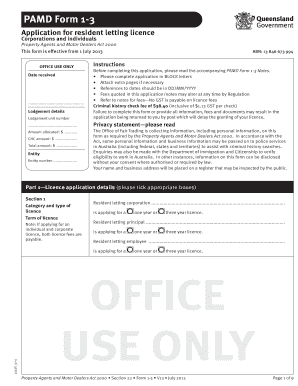
PAMD Form 1-3 Application for resident letting licence Corporations and individuals Property Agents and Motor Dealers Act 2000 This form is effective from 1 October 2012 OFFICE USE ONLY ABN: 13 846.

How it works

  1. Open form

    Open form follow the instructions

  2. Easily sign form

    Easily sign the form with your finger

  3. Share form

    Send filled & signed form or save

How to fill out the Pamd Form 1 3 online

Filling out the Pamd Form 1 3 online can be straightforward if you follow the proper steps. This guide provides clear instructions to help you navigate through each section of the form, whether you are an individual or a corporation applying for a resident letting licence.

Follow the steps to complete your application successfully.

  1. Click the 'Get Form' button to access the Pamd Form 1 3. This action will allow you to open the form in an online editor.
  2. Begin by completing the application in BLOCK letters, ensuring all details are accurate to prevent delays. Read the accompanying notes prior to filling out the form.
  3. In Part 1, select the appropriate category and type of licence you are applying for. Indicate the term for the licence (one year or three years) as applicable.
  4. Proceed to Part 2 and fill in the applicant details. Provide the necessary information for corporation details or individual applicant details as required.
  5. Complete Section 3 with your date, place of birth, and visa details. If any names have changed, provide legal documentation supporting the change.
  6. In Part 4, specify your trading particulars by selecting how you will operate your business. Fill in any additional sections that apply based on your employment status.
  7. Ensure that you fill out the qualifications required in Part 3, providing any necessary evidence of completed courses or previous licence held.
  8. In the trust account section, specify whether you will operate a trust account and provide the details of your appointed auditor if required.
  9. Complete the suitability checklist in Part 9, answering honestly to any questions regarding your eligibility. Your responses are crucial for a successful application.
  10. Review all filled sections for accuracy. When satisfied, save your changes, and download the completed form for your records. You may also print or share the form as necessary.

Start your application process for the Pamd Form 1 3 online today!

Get form

Experience a faster way to fill out and sign forms on the web. Access the most extensive library of templates available.
Get form

Related content

All Forms | Middle District of Pennsylvania |...
Honorable John E. Jones III, Chief Judge | Peter J. Welsh, Clerk of Court ... All Forms...
Learn more
PAMD - SEI Digital Library - Carnegie Mellon...
CMU/SEI-2002-TN-020 iii. List of Figures. Figure 1: General Architectural View. ... In...
Learn more
Installation Instructions
Oct 25, 2001 — 3-3/4. 46-1/4"*. Condensate Drain. 2-3/16. UNIT SIZE. A. B. C. 3 Ton...
Learn more

Related links form

Saint Paul College Va Transcript Request 2020 PATENTE DE INVENCION - Senapi - Senapi Gob Ford Roadside Assistance Claim Form CLIA Disclosure Of Ownership & Control Interest Statement (Form ... - Health Nv

Questions & Answers

Get answers to your most pressing questions about US Legal Forms API.

Contact support

The PAM authentication method is a framework that allows system administrators to integrate multiple authentication technologies seamlessly. It supports various methods such as password authentication, biometric authentication, and more. By utilizing Pamd Form 1 3, you can implement a more robust PAM authentication setup tailored to your security needs.

To determine if an application is PAM aware, check its documentation for references to PAM support or PAM configuration requirements. Additionally, you can observe the application's authentication behavior; if it prompts for credentials processed through PAM, it is likely PAM aware. Applications that utilize Pamd Form 1 3 typically offer enhanced security features.

You can verify PAM by checking the status of the PAM modules and their configurations in the PAM directory. Additionally, you may run tests to ensure that authentication processes behave as expected. If you're working with Pamd Form 1 3, ensure that your configurations are correct to maintain system integrity.

To use PAM for authentication, you need to configure the PAM modules in your system's PAM configuration files. Once set up, PAM will handle the authentication process for users trying to access systems or applications. Make sure you understand how Pamd Form 1 3 fits into this process for a seamless authentication experience.

To check if PAM is installed on your system, you can use the command line. Use the command 'pam-auth-update' or check for PAM-related packages in your package manager. If PAM is not installed, consider implementing solutions that incorporate Pamd Form 1 3 to enhance your system's security.

A PAM code refers to a specific configuration or setting that defines how PAM operates within a system. This code can dictate authentication methods, user session management, and security policies. Understanding PAM codes is essential for effective management of systems that utilize Pamd Form 1 3 for authentication and security.

To log in to PAM, you will typically enter your username and password at the login screen of the application or service that employs PAM for authentication. Once you submit your credentials, PAM processes the information to verify your identity. If you're having trouble, check if your application supports Pamd Form 1 3, as this may affect your login experience.

To edit PAM d files, locate the directory where the PAM configuration files are stored, typically found in '/etc/pam.d/'. Use a text editor to open the specific file you wish to modify. Make sure to back up the original file before making any changes, and ensure that your modifications align with the requirements of your PAM implementation, such as those related to Pamd Form 1 3.

Get This Form Now!

Use professional pre-built templates to fill in and sign documents online faster. Get access to thousands of forms.
Get form
If you believe that this page should be taken down, please follow our DMCA take down processhere.

Industry-leading security and compliance

US Legal Forms protects your data by complying with industry-specific security standards.
  • In businnes since 1997
    25+ years providing professional legal documents.
  • Accredited business
    Guarantees that a business meets BBB accreditation standards in the US and Canada.
  • Secured by Braintree
    Validated Level 1 PCI DSS compliant payment gateway that accepts most major credit and debit card brands from across the globe.
Get Pamd Form 1 3
Get form
Form Packages
Adoption
Bankruptcy
Contractors
Divorce
Home Sales
Employment
Identity Theft
Incorporation
Landlord Tenant
Living Trust
Name Change
Personal Planning
Small Business
Wills & Estates
Packages A-Z
Form Categories
Affidavits
Bankruptcy
Bill of Sale
Corporate - LLC
Divorce
Employment
Identity Theft
Internet Technology
Landlord Tenant
Living Wills
Name Change
Power of Attorney
Real Estate
Small Estates
Wills
All Forms
Forms A-Z
Form Library
Customer Service
Terms of Service
Privacy Notice
Legal Hub
Content Takedown Policy
Bug Bounty Program
About Us
Help Portal
Legal Resources
Blog
Affiliates
Contact Us
Delete My Account
Site Map
Industries
Forms in Spanish
Localized Forms
State-specific Forms
Forms Kit
Legal Guides
Real Estate Handbook
All Guides
Prepared for You
Notarize
Incorporation services
Our Customers
For Consumers
For Small Business
For Attorneys
Our Sites
US Legal Forms
USLegal
FormsPass
pdfFiller
signNow
altaFlow
DocHub
Instapage
Social Media
Call us now toll free:
+1 833 426 79 33
As seen in:
  • USA Today logo picture
  • CBC News logo picture
  • LA Times logo picture
  • The Washington Post logo picture
  • AP logo picture
  • Forbes logo picture
© Copyright 1997-2025
airSlate Legal Forms, Inc.
3720 Flowood Dr, Flowood, Mississippi 39232
Form Packages
Adoption
Bankruptcy
Contractors
Divorce
Home Sales
Employment
Identity Theft
Incorporation
Landlord Tenant
Living Trust
Name Change
Personal Planning
Small Business
Wills & Estates
Packages A-Z
Form Categories
Affidavits
Bankruptcy
Bill of Sale
Corporate - LLC
Divorce
Employment
Identity Theft
Internet Technology
Landlord Tenant
Living Wills
Name Change
Power of Attorney
Real Estate
Small Estates
Wills
All Forms
Forms A-Z
Form Library
Customer Service
Terms of Service
Privacy Notice
Legal Hub
Content Takedown Policy
Bug Bounty Program
About Us
Help Portal
Legal Resources
Blog
Affiliates
Contact Us
Delete My Account
Site Map
Industries
Forms in Spanish
Localized Forms
State-specific Forms
Forms Kit
Legal Guides
Real Estate Handbook
All Guides
Prepared for You
Notarize
Incorporation services
Our Customers
For Consumers
For Small Business
For Attorneys
Our Sites
US Legal Forms
USLegal
FormsPass
pdfFiller
signNow
altaFlow
DocHub
Instapage
Social Media
Call us now toll free:
+1 833 426 79 33
As seen in:
  • USA Today logo picture
  • CBC News logo picture
  • LA Times logo picture
  • The Washington Post logo picture
  • AP logo picture
  • Forbes logo picture
© Copyright 1997-2025
airSlate Legal Forms, Inc.
3720 Flowood Dr, Flowood, Mississippi 39232