Loading
Form preview
  • US Legal Forms
  • Form Library
  • More Forms
  • More Uncategorized Forms
  • 2012 Schedule E Ohio Form

Get 2012 Schedule E Ohio Form

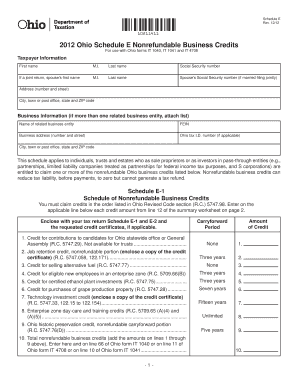
Schedule E Rev. 12/12 10211411 2012 Ohio Schedule E Nonrefundable Business Credits For use with Ohio forms IT 1040 IT 1041 and IT 4708 Taxpayer Information First name M.

How it works

  1. Open form

    Open form follow the instructions

  2. Easily sign form

    Easily sign the form with your finger

  3. Share form

    Send filled & signed form or save

How to fill out the 2012 Schedule E Ohio Form online

Filling out the 2012 Schedule E Ohio Form online can be a straightforward process with the right guidance. This guide provides step-by-step instructions to help you accurately complete the form and claim your nonrefundable business credits.

Follow the steps to fill out the 2012 Schedule E Ohio Form with ease.

  1. Press the ‘Get Form’ button to obtain the 2012 Schedule E Ohio Form and open it in your editor.
  2. Enter your taxpayer information in the designated fields. Include your first name, middle initial, last name, and Social Security number. If filing jointly, provide your spouse's details as well.
  3. Fill in your address, city, state, and ZIP code in the corresponding fields. Ensure that this information is up to date to avoid any processing issues.
  4. For business information, input the name of the related business entity, its Federal Employer Identification Number (FEIN), and the business address. Add the Ohio tax I.D. number if applicable.
  5. Move on to Schedule E-1, where you will list the nonrefundable business credits you intend to claim. Follow the order specified and enter the credit amounts based on your calculations or supporting documents.
  6. Complete Schedule E-2, the nonrefundable business credit summary worksheet. Provide your ownership interests and the corresponding credit amounts, ensuring all calculations meet the requirements.
  7. Review all entered information for accuracy. Make any necessary corrections to ensure that your form is complete and correct.
  8. Once you have filled out the entire form, save your changes and prepare to download, print, or share the form as required for submission.

Begin filling out your 2012 Schedule E Ohio Form online today to take advantage of available business credits!

Get form

Experience a faster way to fill out and sign forms on the web. Access the most extensive library of templates available.
Get form

Related content

2012 Ohio Schedule E Nonrefundable Business...
Schedule E. Rev. 12/12. 2012 Ohio Schedule E Nonrefundable Business Credits. For use with...
Learn more
Income Tax Management of Oil and Gas Lease...
Dec 3, 2012 — A renewed interest in oil and gas leasing in Ohio has the potential to...
Learn more
Earned income tax credit - Wikipedia
To claim the credit with qualifying children, forms 1040A or 1040 must be used with...
Learn more

Related links form

4 222 Application For Process Form Kaizer Chiefs Academy Application Forms 2020 2020 Birth Certificate Waco Tx Addendum To Renew Or Extend Lease Agreement 2020

Questions & Answers

Get answers to your most pressing questions about US Legal Forms API.

Contact support

The Ohio IT 1040 form is the state's individual income tax return, which you must file to report your income earned in Ohio. This form integrates with the 2012 Schedule E Ohio Form if you have rental income or other sources that need to be reported. Filing this form accurately helps you calculate your state tax liability and may also affect your eligibility for certain credits. Accessing the right resources can simplify this process.

On the 2012 Schedule E Ohio Form, line 4 pertains to the exemption amount associated with certain income types. This exemption can impact your overall tax liability, making it essential to understand how it applies to your specific situation. To find the exact amount for your filing year, refer to the Ohio Department of Taxation guidelines or consult with a tax professional. Utilizing resources like US Legal Forms can help clarify these exemptions.

The 2012 Schedule E Ohio Form is used to report income or loss from rental real estate, partnerships, S corporations, estates, and trusts. It allows you to detail your earnings and losses from these sources separately. By completing this form accurately, you can ensure that you meet your tax obligations while maximizing your deductions. Make sure to gather all relevant information before filling out the form.

Yes, Ohio does provide an e-file option for its state tax returns, including the 2012 Schedule E Ohio Form. This option allows you to file your taxes electronically, often resulting in a faster processing time and quicker refunds. You can access e-file services through various online tax preparation platforms, making it easier to submit your forms accurately. Consider using USLegalForms for an efficient way to access e-file options and ensure your submissions are correct.

To file your Ohio state tax return, start by gathering all necessary documents, including your W-2s and the 2012 Schedule E Ohio Form if you have rental income or other applicable income sources. You can choose to file your return electronically through authorized e-filing services or by mailing a paper return to the Ohio Department of Taxation. It's important to ensure that all necessary forms are correctly filled out to avoid delays. Using a service like USLegalForms can guide you through the filing process for a seamless experience.

The Schedule E form is used to report income or loss from rental real estate, partnerships, S corporations, estates, trusts, and other sources. Specifically, the 2012 Schedule E Ohio Form allows you to detail your income and expenses related to these activities, helping to accurately calculate your tax obligations. By filling out this form, you ensure that all your income is accounted for, which is essential for compliance with Ohio tax laws. Utilizing platforms like USLegalForms can simplify the process of obtaining and completing this form.

When you are ready to submit your Ohio tax forms, you should mail them to the appropriate address based on your residency status. For the 2012 Schedule E Ohio Form, if you are a resident, send your forms to the Ohio Department of Taxation, P.O. Box 2476, Columbus, OH 43216. Non-residents should use a different address, which you can find on the Ohio Department of Taxation's website. Make sure to check the latest mailing instructions to ensure your forms arrive on time.

The most famous charter, Magna Carta (“Great Charter”), was a compact between the English king John and his barons specifying the king's grant of certain liberties to the English people.

Steps to writing a project charter Choose a project name. Identify the purpose, objective (goal), and project specification. Set a budget. Define deliverables. Assess scope and risks. Create a timeframe or milestones. List key stakeholders. Layout team roles and responsibilities.

242. Conduct of Business. The Council shall be the sole judge of the election and qualification of its members.

Get This Form Now!

Use professional pre-built templates to fill in and sign documents online faster. Get access to thousands of forms.
Get form
If you believe that this page should be taken down, please follow our DMCA take down processhere.

Industry-leading security and compliance

US Legal Forms protects your data by complying with industry-specific security standards.
  • In businnes since 1997
    25+ years providing professional legal documents.
  • Accredited business
    Guarantees that a business meets BBB accreditation standards in the US and Canada.
  • Secured by Braintree
    Validated Level 1 PCI DSS compliant payment gateway that accepts most major credit and debit card brands from across the globe.
Get 2012 Schedule E Ohio Form
Get form
  • Adoption
  • Bankruptcy
  • Contractors
  • Divorce
  • Home Sales
  • Employment
  • Identity Theft
  • Incorporation
  • Landlord Tenant
  • Living Trust
  • Name Change
  • Personal Planning
  • Small Business
  • Wills & Estates
  • Packages A-Z
  • Affidavits
  • Bankruptcy
  • Bill of Sale
  • Corporate - LLC
  • Divorce
  • Employment
  • Identity Theft
  • Internet Technology
  • Landlord Tenant
  • Living Wills
  • Name Change
  • Power of Attorney
  • Real Estate
  • Small Estates
  • Wills
  • All Forms
  • Forms A-Z
  • Form Library
  • Legal Hub
  • About Us
  • Help Portal
  • Legal Resources
  • Blog
  • Affiliates
  • Contact Us
  • Delete My Account
  • Site Map
  • Industries
  • Forms in Spanish
  • Localized Forms
  • State-specific Forms
  • Forms Kit
  • Real Estate Handbook
  • All Guides
  • Notarize
  • Incorporation services
  • For Consumers
  • For Small Business
  • For Attorneys
  • USLegal
  • FormsPass
  • pdfFiller
  • signNow
  • altaFlow
  • DocHub
  • Instapage
Form Packages
  • Adoption
  • Bankruptcy
  • Contractors
  • Divorce
  • Home Sales
  • Employment
  • Identity Theft
  • Incorporation
  • Landlord Tenant
  • Living Trust
  • Name Change
  • Personal Planning
  • Small Business
  • Wills & Estates
  • Packages A-Z
Form Categories
  • Affidavits
  • Bankruptcy
  • Bill of Sale
  • Corporate - LLC
  • Divorce
  • Employment
  • Identity Theft
  • Internet Technology
  • Landlord Tenant
  • Living Wills
  • Name Change
  • Power of Attorney
  • Real Estate
  • Small Estates
  • Wills
  • All Forms
  • Forms A-Z
  • Form Library
Customer Service
  • Legal Hub
  • About Us
  • Help Portal
  • Legal Resources
  • Blog
  • Affiliates
  • Contact Us
  • Delete My Account
  • Site Map
  • Industries
  • Forms in Spanish
  • Localized Forms
  • State-specific Forms
  • Forms Kit
Legal Guides
  • Real Estate Handbook
  • All Guides
Prepared for you
  • Notarize
  • Incorporation services
Our Customers
  • For Consumers
  • For Small Business
  • For Attorneys
Our Sites
  • USLegal
  • FormsPass
  • pdfFiller
  • signNow
  • altaFlow
  • DocHub
  • Instapage
Social Media
Call us now toll free:
+1 833 426 79 33
As seen in:
© Copyright 1999-2026 airSlate Legal Forms, Inc. 3720 Flowood Dr, Flowood, Mississippi 39232
  • Your Privacy Choices
  • Terms of Service
  • Privacy Notice
  • Content Takedown Policy
  • Bug Bounty Program