Loading
Get Personal Information Application Form - Nz Transport Agency - Nzta Govt
How it works
-

Open form follow the instructions
-

Easily sign the form with your finger
-

Send filled & signed form or save
How to fill out the Personal Information Application Form - NZ Transport Agency - Nzta Govt online
Completing the Personal Information Application Form for the New Zealand Transport Agency is a straightforward process when you have the right guidance. This step-by-step guide offers detailed instructions to assist users in accurately filling out each section of the form online.
Follow the steps to successfully complete the application form.
- Click ‘Get Form’ button to obtain the form and open it in the editor.
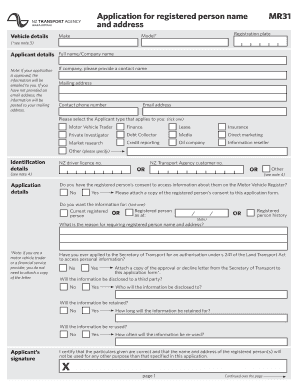
- Begin by filling in the vehicle details section. Provide the registration plate, model (e.g., Corolla, Accord), and make of the vehicle as indicated in the fields.
- In the applicant details section, enter your full name or company name. If you are representing a company, include a contact person's name. Fill in your mailing address, contact phone number, and email address, as this information will be used for communications regarding your application.
- Select the appropriate applicant type by ticking one of the options listed, such as motor vehicle trader or finance. Ensure to choose the correct category relevant to your request.
- Provide identification details by entering your New Zealand driver licence number or NZ Transport Agency customer number. If neither is applicable, indicate that you will provide alternative identification documents.
- Specify whether you have consent from the registered person to access their information. If yes, attach the consent documentation as required.
- Indicate the purpose of requesting the registered person's information by ticking the relevant option (e.g., current registered person or registered person history) and explain your reason in the provided field.
- Answer the questions regarding the disclosure and retention of the information, including whether it will be disclosed to a third party, how long it will be retained, and if it will be reused.
- Complete the applicant’s signature section by certifying that the information provided is correct and that it will be used only for the specified purpose.
- Fill out the payment details section, selecting either credit card payment details or indicating that you are enclosing a cheque for the application fee. Remember that the fee is nonrefundable.
- Once all sections are completed, review your form for accuracy. You can then save changes, download the completed form, print it, or share it as required.
Get started on your application today by completing the form online.
To complete a change of ownership, start by gathering the necessary information about the vehicle and the new owner. Fill out the Personal Information Application Form - NZ Transport Agency - Nzta Govt accurately and submit it online. Once submitted, the ownership transfer will be processed, and both parties will receive confirmation of the change, making the process straightforward and efficient.