Loading
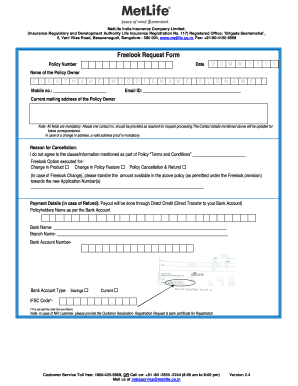
Get Pnb Metlife Look Form
How it works
-

Open form follow the instructions
-

Easily sign the form with your finger
-

Send filled & signed form or save
How to fill out the Pnb Metlife Look Form online
This guide provides a comprehensive overview of how to fill out the Pnb Metlife Look Form online. The process is designed to be straightforward, ensuring all users can successfully complete the form with ease.
Follow the steps to complete the Pnb Metlife Look Form.
- Press the ‘Get Form’ button to access the form and open it in your preferred editing tool.
- Enter your policy number in the designated field to identify your insurance policy.
- Provide the date of filling out the form, using the format D/D/M/M/Y/Y/Y/Y.
- Fill in your name as the policy owner, ensuring to complete the first name, middle name, and surname sections.
- Input your mobile number in the specified field. Make sure to include at least one contact number, as it is necessary for processing your request.
- Enter your email address in the designated field for future correspondence.
- Complete the current mailing address field, which is mandatory for the processing of your request.
- Select the reason for cancellation by checking the appropriate box, such as agreement issues or other provided reasons.
- If applicable, indicate any changes related to the Freelook option that you wish to execute.
- If you are requesting a refund, fill in the payment details, including your bank account information and ensure that the name matches the policyholder's name as per the bank account.
- Attach mandatory documents as specified, including a signed cancelled cheque and the original policy document.
- Review all entered information for accuracy and completeness before submitting the form.
- Finally, save any changes you made, download a copy of the filled form, or print it for your records.
Complete your Pnb Metlife Look Form online now to ensure your requests are processed efficiently.
To freelook your PNB MetLife policy, you must first review your policy document to ensure it meets your needs. If you wish to cancel, follow the procedure outlined in your policy, typically within the freelook period. For additional clarity and forms to facilitate this process, US Legal Forms can be a valuable resource.