Loading
Get 26qaa
How it works
-

Open form follow the instructions
-

Easily sign the form with your finger
-

Send filled & signed form or save
How to fill out the 26qaa online
Filling out the 26qaa form is essential for reporting quarterly returns under section 206A. This guide provides clear instructions to help you navigate through each section of the form with ease, ensuring accurate completion.
Follow the steps to successfully complete your 26qaa form online.
- Click ‘Get Form’ button to obtain the form and open it in the editor.
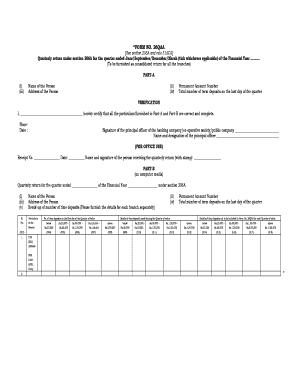
- In Part A, fill in the name of the person and their address. Include the permanent account number (PAN) and the total number of term deposits as of the last day of the quarter.
- In the verification section, the principal officer of the banking company, co-operative society, or public company must certify the accuracy of the information provided in Part A and Part B by signing and dating the document.
- Proceed to Part B, where you will enter the quarterly return details. Specify the quarter ended and the financial year.
- For each branch, provide the breakdown of time deposits. Fill in the number of time deposits on the first day of the quarter for various value ranges, including below Rs. 25,000 up to above Rs. 5,00,000.
- Record details of time deposits made during the quarter for amounts above and below Rs. 5,00,000, and provide a breakdown in the specified value ranges.
- Note any time deposits that should not be included for the next quarter, again breaking down by specified value ranges.
- Complete the form by ensuring that all fields are filled in accurately before saving your changes. You can then download, print, or share the form as needed.
Complete your 26qaa form online today to ensure timely compliance with reporting requirements.
To download the 26Q quarterly return, you need to access the Income Tax Department's website and log into your account. Navigate to the section for filing TDS returns, select the period for which you want the return, and follow the instructions. Utilizing tools like US Legal Forms can simplify this process and ensure that you have the right documents readily available.