Loading
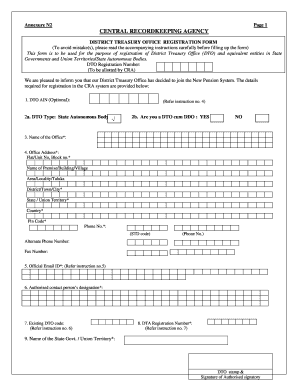
Get Nsdl N2 Form
How it works
-

Open form follow the instructions
-

Easily sign the form with your finger
-

Send filled & signed form or save
How to fill out the Nsdl N2 Form online
Filling out the Nsdl N2 Form online is an important step for the registration of District Treasury Offices and equivalent entities. This guide provides a clear, step-by-step approach to ensure all necessary information is accurately entered in the form.
Follow the steps to complete the Nsdl N2 Form effectively.
- Click ‘Get Form’ button to obtain the form and open it in the editor.
- Begin by filling in the District Treasury Office (DTO) AIN if applicable, noting that it is optional.
- Indicate the type of DTO by selecting 'State Autonomous Body'. Confirm if you are a DTO cum DDO by marking 'yes' or 'no'.
- Enter the name of the office in the designated field.
- Provide the complete office address, ensuring to fill out every required field, including flat/unit number, street name, area, district, state/union territory, country, pin code, and phone number.
- Include an alternate phone number and fax number if applicable.
- Input the official email ID, ensuring it reflects the DTO's email and not an individual's.
- Fill in the designation of the authorized contact person.
- If you have an existing DTO code, provide that information. Otherwise, remember that it should be six digits long, prefixing with zeros if necessary.
- Enter the DTA registration number as allocated by CRA, ensuring it is accurate.
- Specify the name of the relevant state government or union territory.
- Ensure that the form is duly signed by an authorized signatory of the DTO and includes their name, designation, and the date.
- When all fields are completed, review the information for accuracy. Save your changes, then download, print, or share the completed form as needed.
Start filling out your Nsdl N2 Form online today to ensure timely registration.
Related links form
Filling out an NPS form involves several steps, starting with accessing the NSDL website. You will need to choose the NSDL N2 Form and enter your personal information accurately. Make sure to provide all required details, such as your investment preferences and nominee information. Once completed, review your entries before submitting the form to avoid any errors.
Industry-leading security and compliance
US Legal Forms protects your data by complying with industry-specific security standards.
-
In businnes since 199725+ years providing professional legal documents.
-
Accredited businessGuarantees that a business meets BBB accreditation standards in the US and Canada.
-
Secured by BraintreeValidated Level 1 PCI DSS compliant payment gateway that accepts most major credit and debit card brands from across the globe.