Get Kesco
How it works
-

Open form follow the instructions
-

Easily sign the form with your finger
-

Send filled & signed form or save
How to fill out the Kesco online
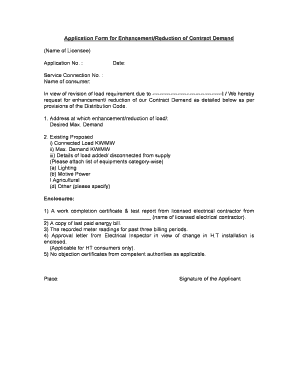
This guide provides comprehensive instructions for completing the Kesco online application form for enhancement or reduction of contract demand. Whether you are adjusting your energy needs or required by specific provisions, this walkthrough will help you through each section.
Follow the steps to successfully complete your application.
- To acquire the form, use the ‘Get Form’ button to access it in your preferred editor.
- Begin filling out the application by entering your name as the licensee and the application number in the appropriate fields. Make sure to also include the service connection number and the date of your application.
- Next, indicate the reason for your request for enhancement or reduction of the contract demand by providing a brief explanation in the designated section.
- In the address section, provide the exact location where the load adjustment will occur. Specify your desired maximum demand as well as details of your existing and proposed connected load in kW/MW.
- List any equipment that has been added or disconnected from supply in the relevant sections. This should include categories such as lighting, motive power, agricultural loads, and any other applicable loads.
- Ensure you attach the required enclosures including a work completion certificate and test report from a licensed electrical contractor, your last paid energy bill, recorded meter readings for the past three billing periods, and, if applicable, the approval letter from the Electrical Inspector.
- If you are a high-tension consumer, include any no-objection certificates from competent authorities as required. Review your entries thoroughly before proceeding.
- Once you have completed all sections and ensured all enclosures are included, you can save any changes made, download the document for your records, print a hard copy, or share the form as necessary.
Complete your application and submit all documents online to ensure a smooth process.
To check your KESCO bill, you can either visit the KESCO website or use the mobile app. After logging in with your account details, you will have access to your current bill and payment history. This online feature simplifies the process, making it easy for you to stay on top of your payments. For any legal inquiries related to billing, consider exploring the US Legal Forms platform for useful resources.
Industry-leading security and compliance
-
In businnes since 199725+ years providing professional legal documents.
-
Accredited businessGuarantees that a business meets BBB accreditation standards in the US and Canada.
-
Secured by BraintreeValidated Level 1 PCI DSS compliant payment gateway that accepts most major credit and debit card brands from across the globe.