Loading
Get Sad 503 Form
How it works
-

Open form follow the instructions
-

Easily sign the form with your finger
-

Send filled & signed form or save
How to fill out the Sad 503 form online
Filling out the Sad 503 form online can streamline your customs declaration process and ensure your information is accurately submitted. This guide will walk you through each step to complete the form effectively, catering to users of all experience levels.
Follow the steps to complete the Sad 503 form online.
- Press the ‘Get Form’ button to access the Sad 503 form and open it for editing.
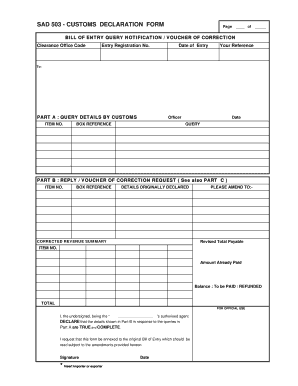
- Begin with Part A, where you will need to enter your clearance office code, entry registration number, date of entry, and your reference number.
- In Part A, provide details about the query by entering the item number, the officer's name, the box reference, the date of the query, and a clear description of the query.
- Move to Part B to respond to the query with details originally declared, corrected revenue summary, and the revised total payable. Make sure to double-check all figures for accuracy.
- Indicate any amounts already paid, including calculating the balance to be paid or refunded. Ensure that the total is clear and accurate.
- In the declaration area, insert the name of the authorized agent, sign, and date the form, confirming the information provided as true and complete.
- Part C requires you to provide reasons and explanations regarding the error subject to correction. Be as detailed as necessary.
- Once all sections are completed, review for accuracy, and then save changes or download the form for printing or sharing as needed.
Complete your Sad 503 form online today to ensure efficient processing!
To properly fill out a customs form, start by entering accurate information about the items being shipped. Be specific about the value and purpose of the shipment. The Sad 503 Form offers a detailed guide that can assist you in completing your customs form correctly, minimizing the risk of errors.