Loading
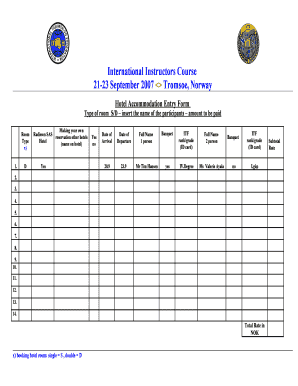
Get Hotel Entry Form
How it works
-

Open form follow the instructions
-

Easily sign the form with your finger
-

Send filled & signed form or save
How to fill out the Hotel Entry Form online
This guide provides step-by-step instructions on how to effectively fill out the Hotel Entry Form online. By following these clear directions, users can ensure that all necessary information is accurately provided for a smooth hotel accommodation process.
Follow the steps to complete the Hotel Entry Form seamlessly.
- Click ‘Get Form’ button to obtain the form and open it in the editor.
- Select the type of room you require, indicating single (S) or double (D) accommodation. Make sure to include the name of each participant who will stay in the room.
- Indicate the hotel name in which you are making a reservation. If making your own Radisson SAS reservation or a booking at another hotel, ensure to specify clearly.
- Provide the date of arrival. Enter the anticipated check-in date accurately in the designated field.
- Specify the date of departure by filling in the expected check-out date in the required section.
- For the first person, write their full name in the appropriate field designated for participant details.
- Indicate if the first person will attend the banquet by selecting 'yes' or 'no'.
- Enter the ITF rank/grade (ID card) for the first participant in the corresponding area.
- Repeat steps 6 to 8 for the second participant, filling in their full name, banquet attendance preference, and ITF rank/grade.
- Continue to fill in details for any additional participants, following the same format for each.
- Calculate the total rate in NOK based on the number of rooms reserved and their type. Provide a subtotal rate for clarity.
- After reviewing all entered information for accuracy, save changes, and proceed to download, print, or share the completed form as needed.
Start completing your Hotel Entry Form online today!
Related links form
A hotel registration form is a document that guests fill out upon check-in, capturing vital information such as your name, contact details, and payment method. This form also serves as a hotel entry form, helping the hotel keep track of guest records and stay preferences. Completing this form accurately ensures a seamless check-in process and enhances your overall experience during your stay.
Industry-leading security and compliance
US Legal Forms protects your data by complying with industry-specific security standards.
-
In businnes since 199725+ years providing professional legal documents.
-
Accredited businessGuarantees that a business meets BBB accreditation standards in the US and Canada.
-
Secured by BraintreeValidated Level 1 PCI DSS compliant payment gateway that accepts most major credit and debit card brands from across the globe.