Loading
Form preview
  • US Legal Forms
  • Other Templates
  • More Forms
  • More Uncategorized Forms
  • Sme Png Application Form

Get Sme Png Application Form

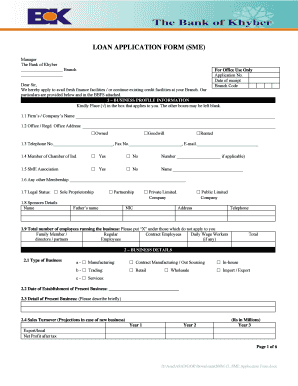
LOAN APPLICATION FORM (SME) Manager The Bank of Khyber Branch For Office Use Only Application No. Date of receipt Branch Code Dear Sir, We hereby apply to avail fresh finance facilities / or continue.

How it works

  1. Open form

    Open form follow the instructions

  2. Easily sign form

    Easily sign the form with your finger

  3. Share form

    Send filled & signed form or save

How to fill out the Sme Png Application Form online

Filling out the Sme Png Application Form is a crucial step for obtaining finance facilities from your bank. This guide will provide you with detailed instructions to help you complete the form accurately and efficiently.

Follow the steps to fill out the Sme Png Application Form online:

  1. Press ‘Get Form’ button to obtain the Sme Png Application Form and open it in your preferred editor.
  2. Begin with the business profile information section. Enter the firm’s or company’s name in the designated space.
  3. Provide the office or registered office address and indicate whether it is owned, goodwill, or rented by checking the appropriate box.
  4. Fill in the telephone number, fax number, and email address in the respective fields.
  5. Indicate membership status with the Chamber of Industry and specify any other memberships, including the SME Association.
  6. Select the legal status of your business by checking the relevant box, such as sole proprietorship, partnership, or private/public limited company.
  7. List the sponsors' details, including name, father's name, company, National Identity Card (NIC) number, address, and telephone number.
  8. Report the total number of employees including family members, regular contract employees, and daily wage workers in the specified fields.
  9. In the business details section, choose the type of business and provide the date of establishment of the present business.
  10. Describe your business briefly and provide sales turnover projections for the next three years.
  11. List your main buyers or customers along with the description of items and terms of sale.
  12. Proceed to the details of the loan requested for, specifying the nature of the facility, purpose, limit, and any required enhancements.
  13. If applicable, fill out the security offered section, detailing any immovable property or personal guarantees.
  14. In the documents section, confirm all required documents are attached, including copies of CNIC, bank statements, and any necessary certificates.
  15. Complete the authorization and declaration section, ensuring all statements are signed and dated correctly.
  16. For each additional partner or director, attach their profiles as needed.
  17. Finally, save your changes, download the completed application, print a copy for your records, and share it as necessary.

Begin filling out your Sme Png Application Form online today to secure the financing you need for your business.

Get form

Experience a faster way to fill out and sign forms on the web. Access the most extensive library of templates available.
Get form

Related content

Small Business Administration
We support America's small businesses. The SBA connects entrepreneurs with lenders and...
Learn more
Implementing a Pilot SME Voucher Scheme in ......
SMEs should submit a basic application form detailing the nature of the project that they...
Learn more
Superheat Form - The RuneScape Wiki
Superheat Form is a Seren Prayer unlocked upon completion of The Light Within. Superheat...
Learn more

Related links form

Kolkatamycity Dao 92 29 Sbi Withdrawal Form Notary Application Form Pdf

Questions & Answers

Get answers to your most pressing questions about US Legal Forms API.

Contact support

To open an SME account in Papua New Guinea, start by completing the Sme Png Application Form. You will also need to provide your business registration details, identification, and any relevant financial information. Visit your chosen bank to discuss account options tailored for SMEs. This account can help with managing finances and accessing services designed for small businesses.

Setting up an SME in Papua New Guinea requires a few essential steps. First, you need to complete the Sme Png Application Form to initiate the registration process. Additionally, you must provide proof of identification, a business plan, and comply with tax registration. Familiarizing yourself with local laws and regulations can help ensure a smooth setup for your SME.

A Small and Medium Enterprise (SME) in Papua New Guinea refers to a business that operates with a limited scale, typically focused on local markets. These enterprises play a crucial role in the economy by creating jobs and fostering innovation. The Sme Png Application Form is essential for businesses looking to register and benefit from government support. SMEs are vital for driving economic growth and providing essential services.

To open a Small and Medium Enterprise (SME) in Papua New Guinea, you must first complete the Sme Png Application Form. Next, gather the necessary documentation, such as a business plan and identification. After that, submit your application to the relevant authorities. Finally, ensure you comply with local regulations to successfully launch your SME.

Registering an SME in PNG involves several steps, starting with completing the Sme Png Application Form. You must provide necessary details about your business, including its structure and ownership. Once you have submitted the form, the relevant authorities will review your application. After approval, you will receive your business registration certificate, allowing you to operate legally.

To open an SME account with BSP Bank, you need to complete the Sme Png Application Form. First, gather your business registration documents and identification. Then, visit a BSP Bank branch or their website to submit your application and supporting documents. Once approved, you can enjoy the benefits of having an SME account tailored for your business needs.

To open a SME bank account, you will first need to gather essential documents, including your business registration papers and tax identification numbers. Next, visit your preferred bank and fill out the necessary forms. Many banks offer online applications, so you can also look for the Sme Png Application Form on their website for convenience. Ensure that you understand the account features and fees before finalizing your choice.

Kuala Lumpur, 15 August 2022 – Hong Leong Bank's (“HLB” or the “Bank”) commitment to the growth and sustainability of Small and Medium-sized Enterprise (“SMEs”) in Malaysia has earned the Bank the 'Best SME Bank in Malaysia' award for four years running by the eminent The Asian Banker at their Retail Financial Services ...

PERSONAL NEW ACCOUNT APPLICATION FORM. Account Information. ... Personal Details – Customer 1. Customer Number: ... Account Holder Contact Details. Residential Address: ... Identification Details. ID Type 1: ... Personal Details – Customer 2. Customer Number: ... Account Holder Contact Details. ... Identification Details. ... Term Deposits.

How do I open an SME account? Step 1: Visit SME First Account's page and click 'APPLY NOW'. Step 2: Fill up the necessary details and select 'LET'S BEGIN'. Step 3: Select 'I WANT TO APPLY NOW'. Step 4: Fill in your details and click submit. Step 5: Summary of your application details will be shown.

Get This Form Now!

Use professional pre-built templates to fill in and sign documents online faster. Get access to thousands of forms.
Get form
If you believe that this page should be taken down, please follow our DMCA take down processhere.
Get Sme Png Application Form
Get form
  • Adoption
  • Bankruptcy
  • Contractors
  • Divorce
  • Home Sales
  • Employment
  • Identity Theft
  • Incorporation
  • Landlord Tenant
  • Living Trust
  • Name Change
  • Personal Planning
  • Small Business
  • Wills & Estates
  • Packages A-Z
  • Affidavits
  • Bankruptcy
  • Bill of Sale
  • Corporate - LLC
  • Divorce
  • Employment
  • Identity Theft
  • Internet Technology
  • Landlord Tenant
  • Living Wills
  • Name Change
  • Power of Attorney
  • Real Estate
  • Small Estates
  • Wills
  • All Forms
  • Forms A-Z
  • Other Templates
  • Legal Hub
  • About Us
  • Help Portal
  • Legal Resources
  • Blog
  • Affiliates
  • Contact Us
  • Delete My Account
  • Site Map
  • Industries
  • Forms in Spanish
  • Localized Forms
  • State-specific Forms
  • Forms Kit
  • Real Estate Handbook
  • All Guides
  • Notarize
  • Incorporation services
  • For Consumers
  • For Small Business
  • For Attorneys
  • USLegal
  • FormsPass
  • pdfFiller
  • signNow
  • altaFlow
  • DocHub
  • Instapage
Form Packages
  • Adoption
  • Bankruptcy
  • Contractors
  • Divorce
  • Home Sales
  • Employment
  • Identity Theft
  • Incorporation
  • Landlord Tenant
  • Living Trust
  • Name Change
  • Personal Planning
  • Small Business
  • Wills & Estates
  • Packages A-Z
Form Categories
  • Affidavits
  • Bankruptcy
  • Bill of Sale
  • Corporate - LLC
  • Divorce
  • Employment
  • Identity Theft
  • Internet Technology
  • Landlord Tenant
  • Living Wills
  • Name Change
  • Power of Attorney
  • Real Estate
  • Small Estates
  • Wills
  • All Forms
  • Forms A-Z
  • Other Templates
Customer Service
  • Legal Hub
  • About Us
  • Help Portal
  • Legal Resources
  • Blog
  • Affiliates
  • Contact Us
  • Delete My Account
  • Site Map
  • Industries
  • Forms in Spanish
  • Localized Forms
  • State-specific Forms
  • Forms Kit
Legal Guides
  • Real Estate Handbook
  • All Guides
Prepared for you
  • Notarize
  • Incorporation services
Our Customers
  • For Consumers
  • For Small Business
  • For Attorneys
Our Sites
  • USLegal
  • FormsPass
  • pdfFiller
  • signNow
  • altaFlow
  • DocHub
  • Instapage
Social Media
Call us now toll free:
+1 833 426 79 33
As seen in:
© Copyright 1999-2026 airSlate Legal Forms, Inc. 17 Station Street, Suite 303, Brookline, MA 02445
  • Your Privacy Choices
  • Terms of Service
  • Privacy Notice
  • Content Takedown Policy
  • Bug Bounty Program