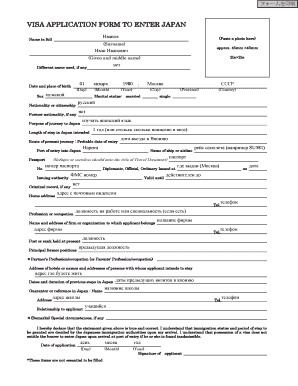
Get Visa Application Form To Enter Japan With Qr Code
How it works
-

Open form follow the instructions
-

Easily sign the form with your finger
-

Send filled & signed form or save
How to fill out the Visa Application Form To Enter Japan With Qr Code online
Filling out the Visa Application Form To Enter Japan With Qr Code online is an essential step for those planning to visit Japan. This guide provides clear instructions on how to complete the form accurately and efficiently to streamline your application process.
Follow the steps to complete the visa application form online
- Click ‘Get Form’ button to obtain the form and open it in the editor.
- Begin by entering your full name in the designated fields. Ensure to include your surname as well as your given and middle names.
- Provide your date and place of birth by entering the day, month, and year, along with the city, province, and country of birth.
- Indicate your marital status by selecting from the options provided, such as married or single.
- Enter your nationality or citizenship, and detail any former nationality if applicable.
- State the purpose of your journey to Japan and the intended length of your stay.
- Provide information on your route of travel, probable date of entry, and port of entry into Japan, including the name of the airline or ship.
- Fill in your passport number, the type of passport (diplomatic, official, ordinary), and the issuing authority, along with the validity dates.
- Complete the section regarding your criminal record, home address, and contact telephone number.
- Include details about your profession or occupation and provide the name and address of your employer or the organization you belong to, including their contact number.
- Mention your current post or rank held, alongside principal former positions held.
- If applicable, provide information about your partner's or parents' profession.
- Input the address of accommodations you'll be staying at or the names and addresses of individuals you intend to visit in Japan.
- Detail any previous stays in Japan, including dates and duration.
- If applicable, provide information for a guarantor or reference in Japan, including their name, address, telephone number, and relationship to you.
- Address any special circumstances you may wish to mention in the remarks section.
- Finally, review the application for accuracy. Confirm your understanding of the visa process, including the declaration that your information is true and correct.
- Enter the date of application and provide your signature in the designated field.
- Save any changes made, and choose to download, print, or share the completed form as necessary.
Start your online visa application process today to ensure a smooth journey to Japan.
Filling out customs forms online for Japan can be done effectively using the Visa Application Form To Enter Japan With Qr Code. Start by accessing the official customs website or platforms like US Legal Forms, which guide you through the process. Make sure to provide all necessary details, such as your items and their values, to prevent any issues upon arrival. Completing this form accurately will help expedite your entry into Japan.