Get Document Withdrawn As Of 5/12/2009 Uncontrolled When Printed Pro No
How it works
-

Open form follow the instructions
-

Easily sign the form with your finger
-

Send filled & signed form or save
How to fill out the Document Withdrawn As Of 5/12/2009 Uncontrolled When Printed Pro No online
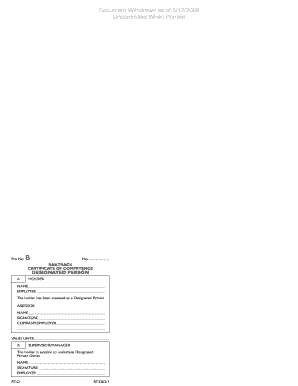
Filling out the Document Withdrawn As Of 5/12/2009 Uncontrolled When Printed Pro No is essential for ensuring proper documentation for designated persons. This guide will provide you with step-by-step instructions to fill out the form accurately and efficiently.
Follow the steps to successfully complete the form.
- Click the ‘Get Form’ button to access the document and open it in the editing interface.
- In the 'Holder' section, provide the full name of the person who is being designated. This information is crucial as it identifies the individual responsible for designated person duties.
- Fill in the 'Employer' field. This should reflect the organization or company that employs the designated person.
- In the 'Assessor' section, enter the name of the person conducting the assessment. It is important that this individual is recognized for their competency.
- Include the 'Signature' of the assessor in the designated space provided to validate the assessment.
- In the 'Company/Employer' field, ensure that the name of the employer or organization conducting the assessment is filled in correctly.
- Specify the 'Valid Until' date. This represents the expiration of the certificate and should be completed as per the assessment's validity.
- For the 'Supervisor/Manager' section, provide the full name of the supervisor or manager overseeing the designated person.
- Obtaining the 'Signature' of the supervisor/manager is essential to confirm their acknowledgment of the designated person's suitability.
- Please review all filled-out fields for accuracy before proceeding to save changes or submit your form.
- Once you have completed the form, you can save your changes, download, print, or share the document as required.
Complete your documents online today for efficient and effective management!
To print sensitive documents securely, always use a trusted platform like uslegalforms. Start by ensuring that your digital files are up-to-date and appropriately labeled, such as 'Document Withdrawn As Of 5/12/2009 Uncontrolled When Printed Pro No.' This helps maintain clarity and control. Additionally, consider using secure printers and limiting access to printed materials to safeguard sensitive information.
Industry-leading security and compliance
-
In businnes since 199725+ years providing professional legal documents.
-
Accredited businessGuarantees that a business meets BBB accreditation standards in the US and Canada.
-
Secured by BraintreeValidated Level 1 PCI DSS compliant payment gateway that accepts most major credit and debit card brands from across the globe.