Loading
Get Srg1173
How it works
-

Open form follow the instructions
-

Easily sign the form with your finger
-

Send filled & signed form or save
How to fill out the SRG1173 online
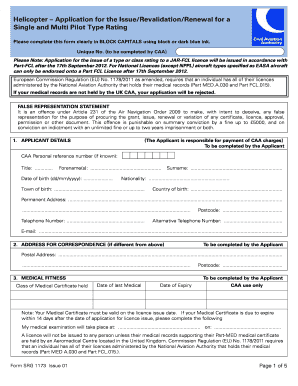
This guide provides comprehensive instructions on completing the SRG1173 form online. Whether you are applying for the issue, revalidation, or renewal of a helicopter type rating, this step-by-step approach will ensure your submission is accurate and complete.
Follow the steps to successfully complete the SRG1173 form.
- Click ‘Get Form’ button to obtain the form and open it in the online editor.
- Begin by filling out the applicant details section. This includes entering your CAA personal reference number (if known), title, forename(s), surname, date of birth, nationality, town and country of birth, permanent address, telephone number, alternative telephone number, and email. Ensure your information is clear and complete.
- Next, complete the address for correspondence if it differs from your permanent address. This should include the postal address where you wish to receive correspondence regarding your application.
- Move on to the medical fitness section. Indicate the class of medical certificate you hold and provide the date of your last medical examination as well as its expiry date. Make note of the requirement that your medical certificate must be valid on the license issue date.
- Proceed to fill out particulars of any UK or non-UK licenses you hold. For each license, include the issuing authority, type or class of license, license number, and expiry date.
- In the ratings held section, list the most recent skill test, proficiency check, or revalidation by experience for each type and/or class rating. Include the date of the test and the expiry date of the rating.
- In the application section, select whether you are applying for initial issue, revalidation, or renewal of a helicopter type rating. Specify if your application involves single pilot or multi-pilot endorsements.
- Complete the confirmation section by providing details of your skill test or proficiency check, including examiner's name and number.
- Review the declaration section. Confirm that all information is correct, that you have reviewed guidance notes, and agree to receive safety material as indicated.
- Finally, indicate your payment details. Ensure you include the required charges, specify the method of payment, and provide the necessary banking information.
- Once all sections are filled out appropriately, review the entire form for accuracy. You can then save your changes, download, print, or share the completed form as needed.
Complete your SRG1173 form online today to ensure a smooth application process.
Filling out a DA Form 5960 involves providing detailed information about your housing allowance and related financial data. Ensure that each section is clear and complete, as this impacts your benefits. Following the Srg1173 process will guide you through the necessary steps. If you require additional help, US Legal Forms is a valuable resource that offers templates and advice tailored to your needs.
Industry-leading security and compliance
US Legal Forms protects your data by complying with industry-specific security standards.
-
In businnes since 199725+ years providing professional legal documents.
-
Accredited businessGuarantees that a business meets BBB accreditation standards in the US and Canada.
-
Secured by BraintreeValidated Level 1 PCI DSS compliant payment gateway that accepts most major credit and debit card brands from across the globe.