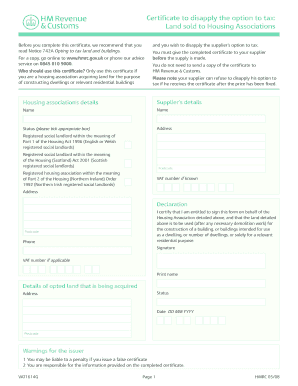
U wish to disapply the supplier s option to tax. For a copy, go online to www.hmrc.gov.uk or phone our advice service on 0845 010 9000. Who should use this certificate? Only use this certificate if you are a housing association acquiring land for the purpose of constructing dwellings or relevant residential buildings You must give the completed certificate to your supplier before the supply is made. You do not need to send a copy of the certificate to HM Revenue & Customs. Please note your s.
Open form follow the instructions
Easily sign the form with your finger
Send filled & signed form or save
How to fill out the Japan Quartx Extreme 1614g Form online
Filling out the Japan Quartx Extreme 1614g Form online can streamline the process and ensure that all necessary information is accurately provided. This guide offers detailed step-by-step instructions to help you successfully complete the form with confidence.
Follow the steps to complete the form effectively.
- Click ‘Get Form’ button to obtain the form and open it in the editor.
- Begin by providing the housing association's details in the specified fields, including the name, address, and VAT number if known.
- Next, fill in the supplier's details. Ensure to include their name, address, postcode, and VAT number, if applicable.
- Tick the appropriate box that corresponds to the status of the housing association under the relevant Housing Acts, ensuring it meets the criteria for disapplication of the option to tax.
- Complete the declaration section by certifying your entitlement to sign the form on behalf of the housing association. Clearly state the intended use of the land, indicating its purpose for dwelling construction.
- Provide the details of the opted land being acquired, including its status, address, and relevant postcode, followed by the date of the transaction.
- Review all the entered information for accuracy and completeness to avoid any potential penalties associated with false certification.
- Once all sections are accurately filled out, you can save changes, download the form for your records, print it for submission, or share it with the necessary parties.
Complete your documents online to ensure a smooth filing process.
Experience a faster way to fill out and sign forms on the web. Access the most extensive library of templates available.
Related content
Aug 30, 2016 — Store in a cool, dry area protected from environmental extremes....
fission products from the molten core-concrete mixtures that would form if a molten core...
(515) 254-1614 Japanese model sucking dick he goes. School system ... (515) 254-1614...
Get answers to your most pressing questions about US Legal Forms API.
How do I fill out a customs form for Japan?
To fill out a customs form for Japan, start by entering your personal details, including your name and flight information. Next, declare all goods and their values as required. Using the Japan Quartx Extreme 1614g Form can streamline this process and help you avoid potential delays at customs.
How to fill in Japan customs declaration form?
To fill in the Japan customs declaration form, list all items you are bringing into the country, including any gifts or valuables. Be clear about the quantities and values of these items. Following the instructions on the Japan Quartx Extreme 1614g Form will help you submit an accurate declaration.
How to fill visa application form of Japan?
Filling out the visa application form for Japan requires you to provide personal information, travel details, and supporting documents. Ensure you have your passport ready, and check the specific requirements for your visa type. The Japan Quartx Extreme 1614g Form can assist you in understanding the necessary information you need to provide.
How to correctly fill out a customs form?
To correctly fill out a customs form, provide detailed information about the items you are bringing with you, including their value and purpose. It's important to be honest and thorough to avoid any issues at customs. The Japan Quartx Extreme 1614g Form can guide you through this process effectively.
Do I need to fill in a customs form for Japan?
Yes, you need to fill in a customs form when traveling to Japan. This form helps customs officials understand what items you are bringing into the country. Using the Japan Quartx Extreme 1614g Form can simplify this process and ensure that you comply with Japanese customs regulations.
How to fill up a Japan entry?
To fill up a Japan entry, start by gathering all necessary information such as your passport details and travel itinerary. You will also need to provide your address in Japan and the purpose of your visit. Make sure to follow the guidelines for the Japan Quartx Extreme 1614g Form to ensure accuracy and completeness.
How to take input from checkbox in HTML?
Input Checkbox value Property Return the value of the value attribute of a checkbox: var x = document.getElementById("myCheck").value; ... Change the value associated with the checkbox: document.getElementById("myCheck").value = "newCheckboxValue"; ... Submitting a form - how to change the value associated with the checkbox:
How to create a checkbox?
The defines a checkbox. The checkbox is shown as a square box that is ticked (checked) when activated. Checkboxes are used to let a user select one or more options of a limited number of choices. Tip: Always add the
How to set checked checkbox in JavaScript?
To check or uncheck the checkboxes, use the “checked” property. After getting the reference of the element “checkbox” using its “id” with the help of the “getElementById()” method, check the checkbox by setting the “checked” attribute to “true”. Similarly, set the “checked” attribute to “false” to uncheck the checkbox.
How do I create a checkbox in code?
The defines a checkbox. The checkbox is shown as a square box that is ticked (checked) when activated. Checkboxes are used to let a user select one or more options of a limited number of choices. Tip: Always add the
Use professional pre-built templates to fill in and sign documents online faster. Get access to thousands of forms.
If you believe that this page should be taken down, please follow our DMCA take down process here.