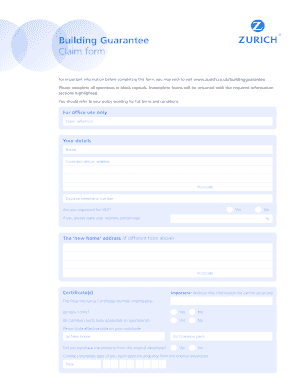
Get Zurich Building Guarantee Claim Form
How it works
-

Open form follow the instructions
-

Easily sign the form with your finger
-

Send filled & signed form or save
How to fill out the Zurich Building Guarantee Claim Form online
Filing a claim with Zurich Building Guarantee is a straightforward process that can be completed online. This guide provides clear, step-by-step instructions to help you fill out the Zurich Building Guarantee Claim Form correctly, ensuring that your claim is processed efficiently and without delays.
Follow the steps to complete your claim form online with ease.
- Click the ‘Get Form’ button to access the Zurich Building Guarantee Claim Form, ensuring you have the correct version of the document open in your editor.
- Fill in your details in block capitals, including your full name, correspondence address, postcode, and daytime telephone number.
- Indicate whether you are registered for VAT by selecting 'Yes' or 'No.' If you select 'Yes,' provide your recovery percentage.
- If your address is different from the correspondence address, provide the 'new home' address and postcode.
- Complete the certification section by entering the Final/Insurance Certificate Number, and indicate if this claim pertains to a new home or common parts by selecting 'Yes' or 'No.' Include the effective date and state whether you purchased the property from the original developer.
- Enter the details of the developer, including their name, Zurich registration number, and address.
- Indicate whether the developer has been informed of the loss, defect, or damage, and if so, provide copies of any correspondence.
- State if the developer is still trading by choosing 'Yes' or 'No.'
- Describe the loss, defect, or damage, including the date of discovery, your estimate of the cost, and any additional relevant details or reports that support your claim.
- If applicable, state the amount of any retention monies held on the property and provide details of any other insurances covering the property.
- Fill out the declaration section, affirming that all information provided is correct, and include your signature(s) and the date.
- Once completed, save your changes, and you can download, print, or share the form before submitting it to the Building Guarantee Department.
Complete your Zurich Building Guarantee Claim Form online today to ensure your claim is processed swiftly.
To email Zurich's claims department, visit their official website for the correct email address. When composing your message, include your policy number and a brief description of your claim. If you have completed the Zurich Building Guarantee Claim Form, attach it to your email for reference. This will help the claims team assist you more effectively.
Industry-leading security and compliance
-
In businnes since 199725+ years providing professional legal documents.
-
Accredited businessGuarantees that a business meets BBB accreditation standards in the US and Canada.
-
Secured by BraintreeValidated Level 1 PCI DSS compliant payment gateway that accepts most major credit and debit card brands from across the globe.